Larkup gets out of your way. There is no server to configure, no pipeline to build. Three steps and you are chatting with your data.
1
Enter your API key
When you open Larkup for the first time you will see the onboarding screen. Paste your API key from any supported provider, including OpenAI, Anthropic, Google, and DeepSeek, then click Save. The key is stored locally in your browser and used for chat and embedding calls.
Choose a provider and save your API key
You can change your model provider at any time from Settings → AI Models.
2
Go to the Data page and load something
Click Data in the left sidebar, then choose the source that matches your content.
Website
Text
Integrations
CSV
PDF
Video
Paste a page or domain URL. You can crawl it directly or search for pages by keyword.
Add content from a website
Paste notes, transcripts, or any text you want to search, with a title.
Adding raw text directly
Open Integrations, choose Notion or another source, then select Configure or Connect. After authorization, Larkup adds the selected content to your knowledge base.
Choose Notion or another connected data source
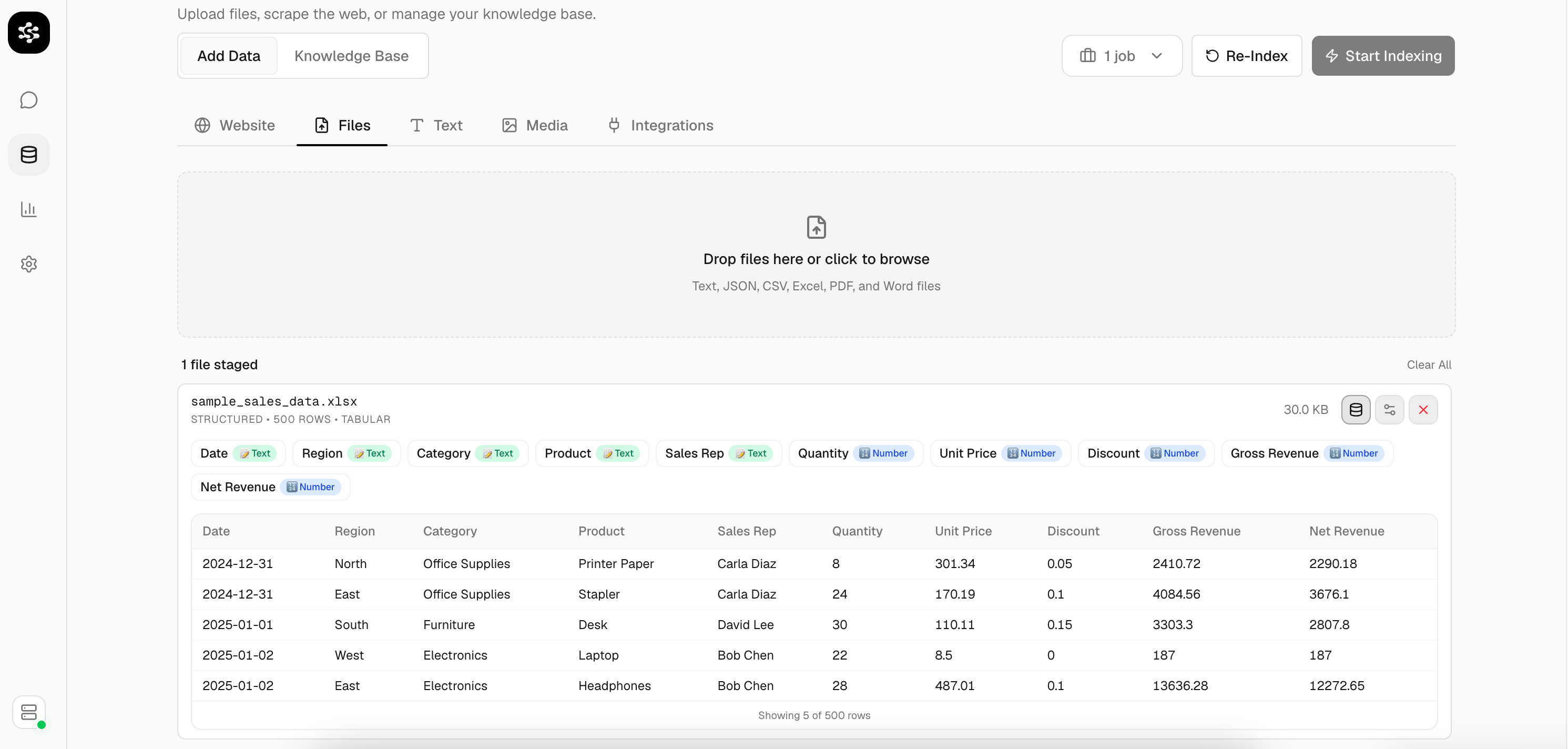
Open Files and upload a CSV or Excel file. Larkup previews the columns and rows before indexing.
Review structured data before indexing
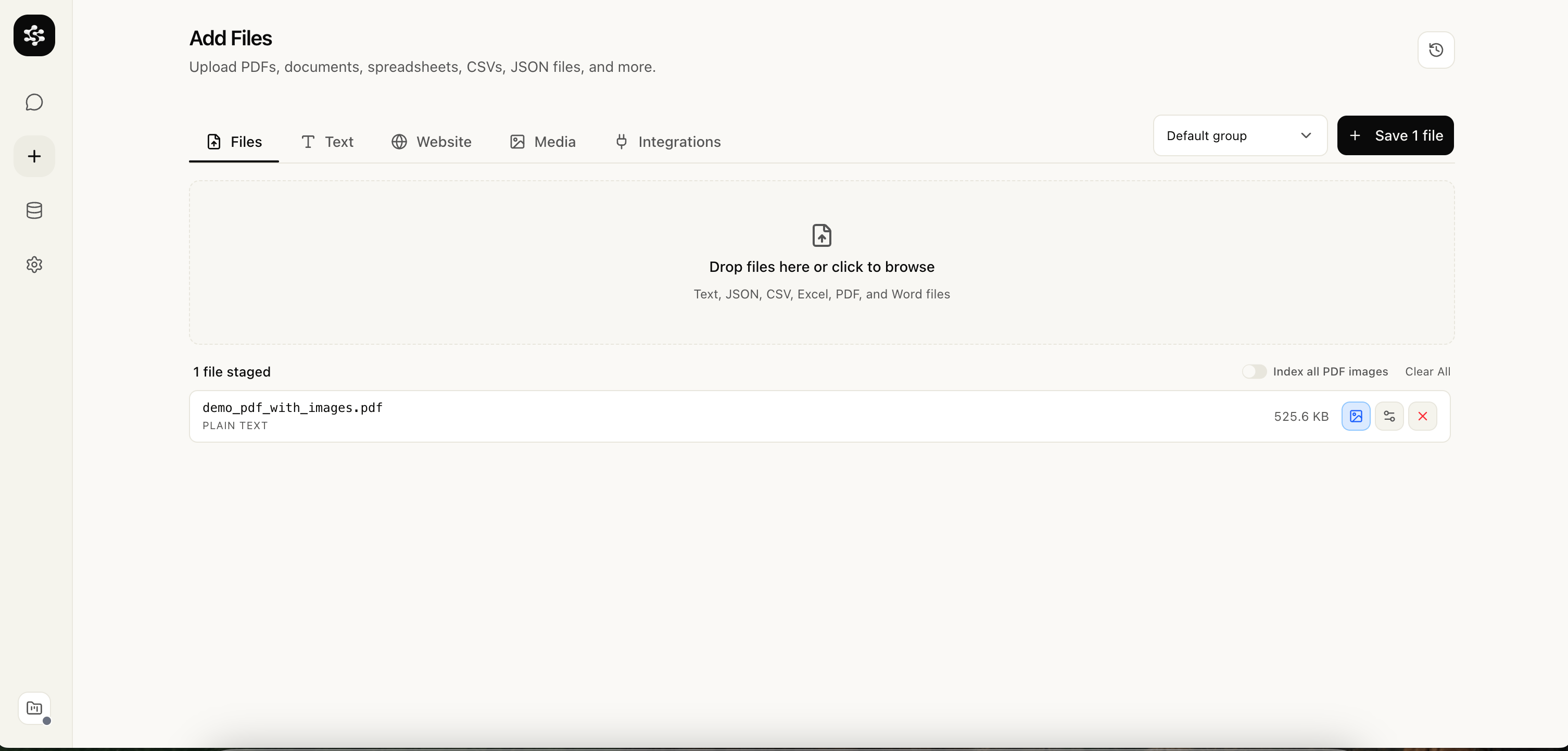
Open Files and drop in a PDF. You can add one file or stage several files together.
Add a PDF from the Files tab
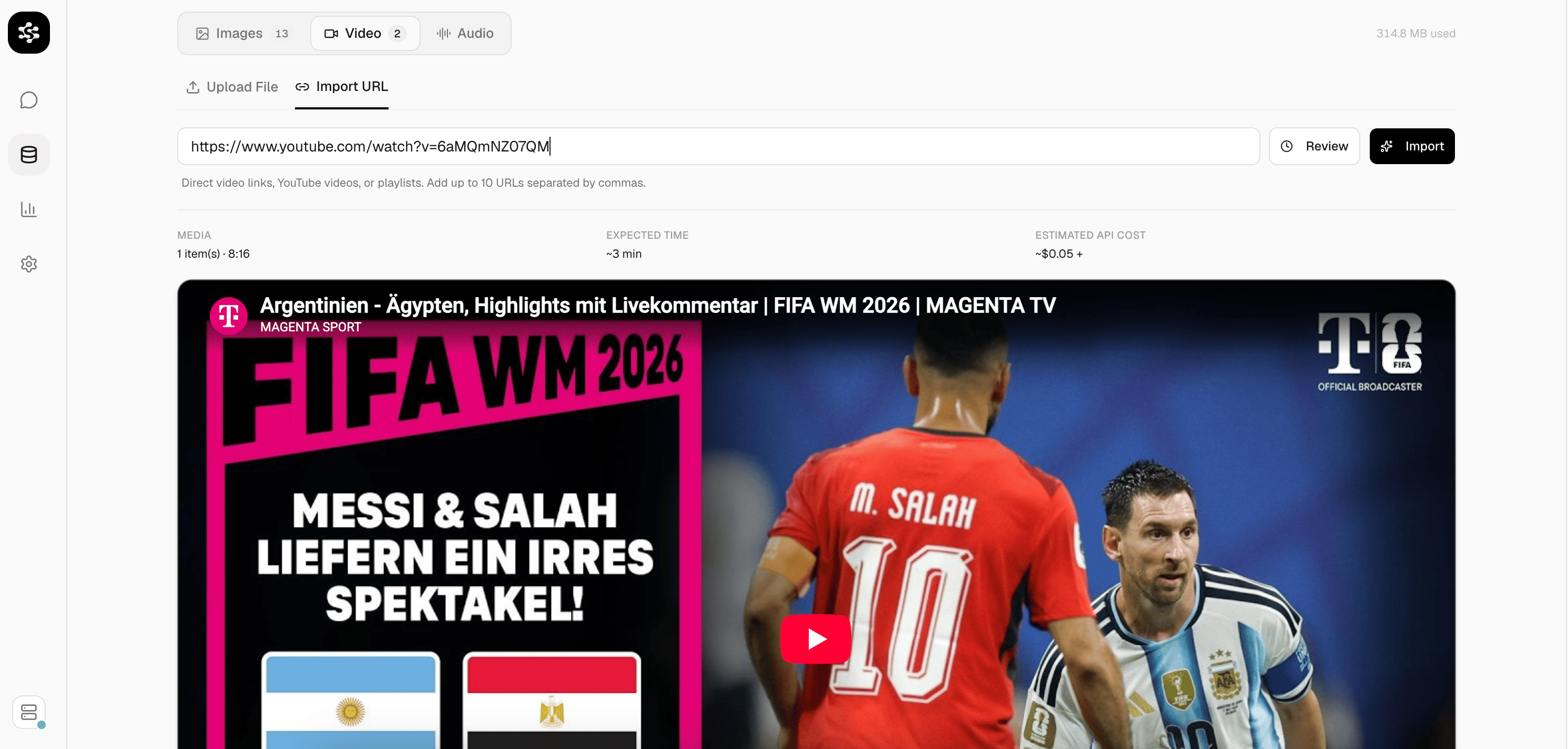
Open Media to upload a video or import a YouTube URL. Review the duration and estimated processing cost before you confirm.
Review a YouTube video before import
Once you confirm, Larkup indexes the content in the background. You can watch progress in real time. There is no separate indexing step.
Indexing progress for a PDF upload
3
Open Chat and start asking
Click Chat in the sidebar. Select an LLM from the dropdown at the top and ask anything about your data. Answers are grounded in what you loaded, with source citations shown in the sidebar.
Chat answering a question from an uploaded spreadsheet
4
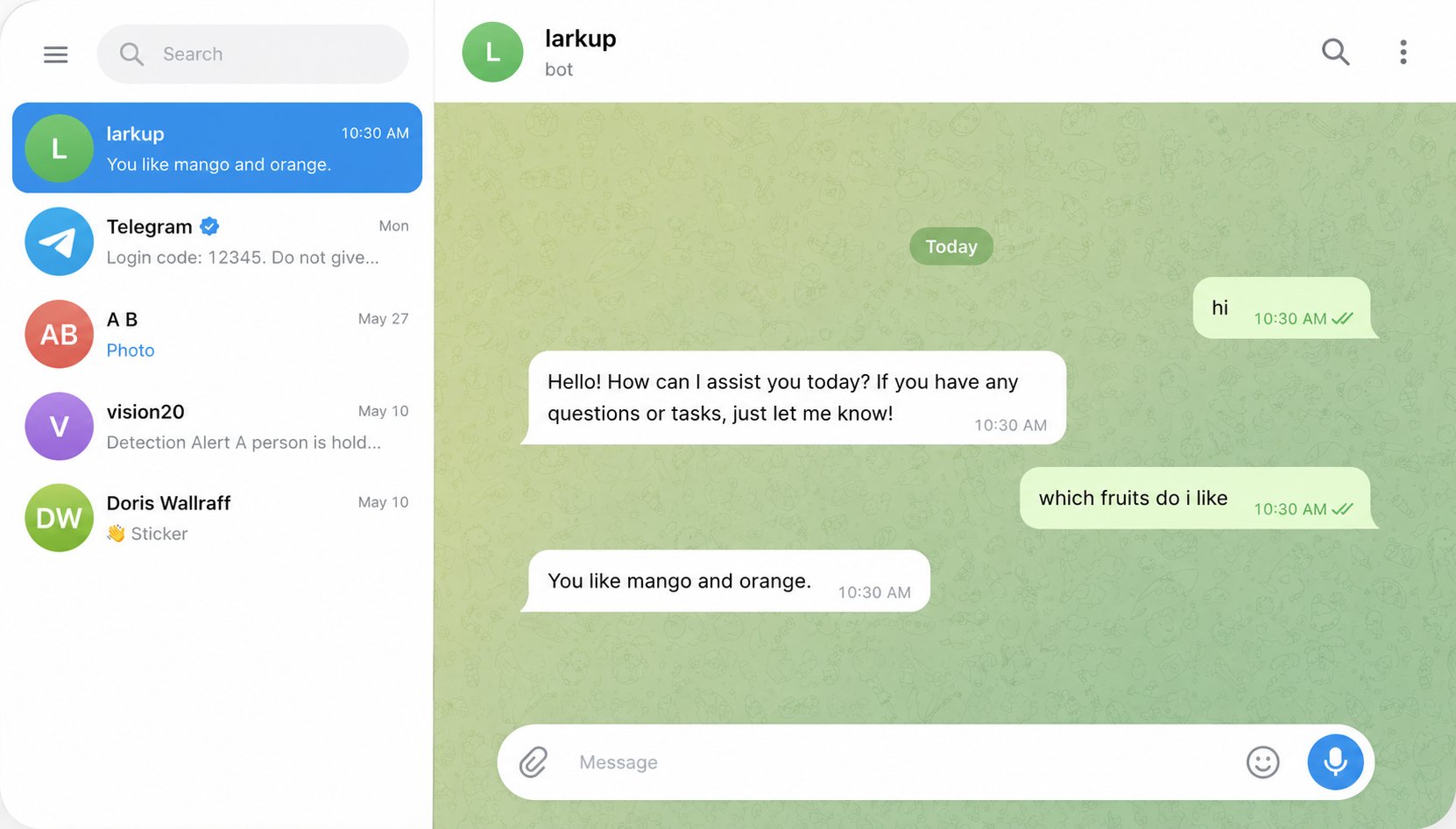
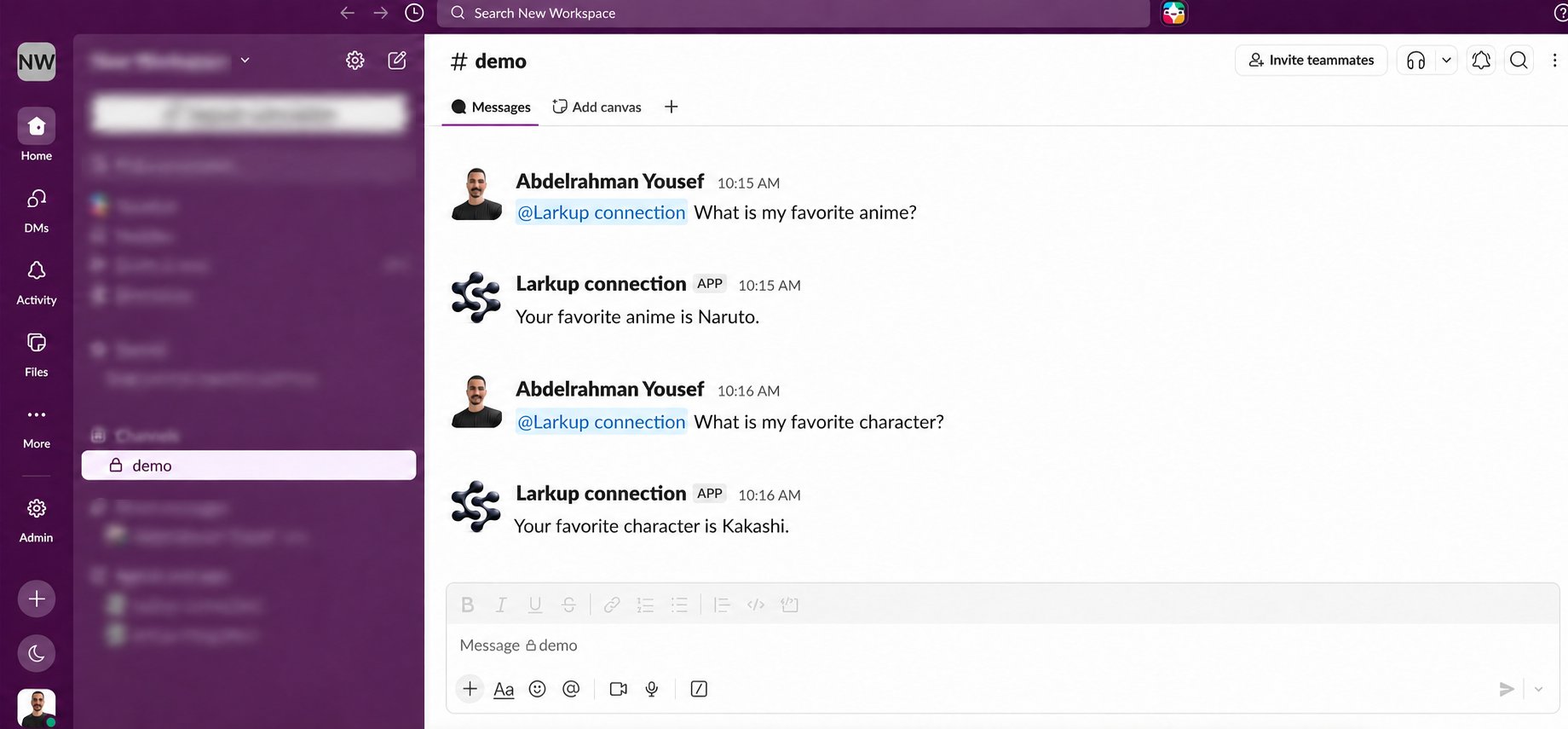
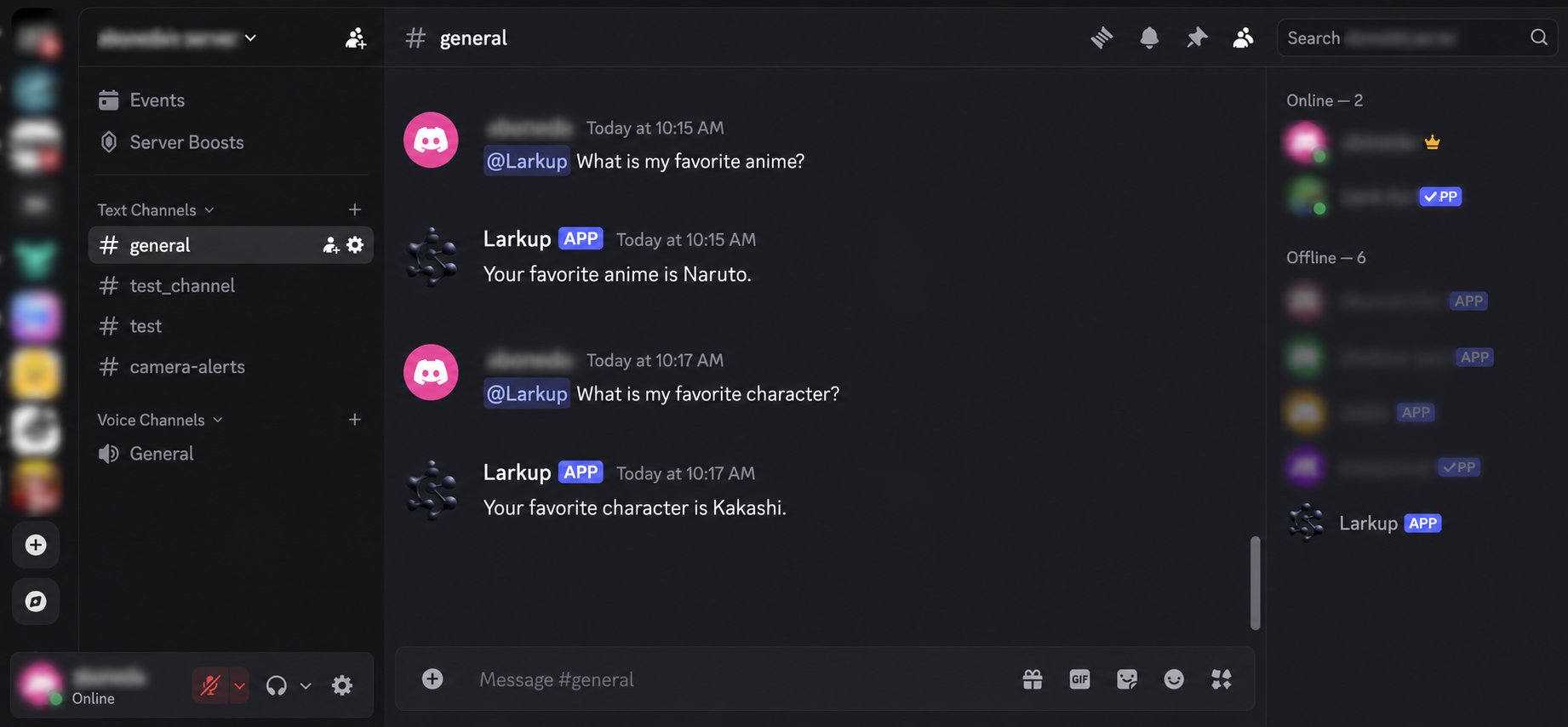
OR: Talk to it from social media
Connect the same Agent to Telegram, Slack, or Discord and answer questions right where your team already talks.
Prefer the terminal? The CLI covers the same workflow. See the CLI Reference.
{"docsConfig":{"theme":"mint","$schema":"https://mintlify.com/docs.json","name":"Larkup","colors":{"primary":"#000000","light":"#000000","dark":"#222222"},"logo":{"light":"https://mintcdn.com/larkup/J0lnyYIE7T-PEajl/documentation/logo/logo-light2.png?fit=max\u0026auto=format\u0026n=J0lnyYIE7T-PEajl\u0026q=85\u0026s=a8d0f36de4d9d0698e8a6ee73e6bf1aa","dark":"https://mintcdn.com/larkup/J0lnyYIE7T-PEajl/documentation/logo/logo-dark2.png?fit=max\u0026auto=format\u0026n=J0lnyYIE7T-PEajl\u0026q=85\u0026s=fa0405df7faa06592472499c015d828c"},"favicon":"https://mintcdn.com/larkup/J0lnyYIE7T-PEajl/documentation/images/favicon.ico?fit=max\u0026auto=format\u0026n=J0lnyYIE7T-PEajl\u0026q=85\u0026s=feef65be53c3a3fe73a8289e38d3fd83","background":{"color":{"light":"#F9FAFB","dark":"#0F1117"}},"navbar":{"links":[{"href":"mailto:abdelrahmanaboneda@gmail.com","label":"Support"}],"primary":{"type":"button","label":"GitHub","href":"https://github.com/Larkup-AI/larkup"}},"footer":{"socials":{"github":"https://github.com/Larkup-AI/larkup"}},"contextual":{"options":["copy"],"display":"header"},"styling":{"latex":false},"navigation":{"pages":[]}},"deployment":{"deploymentMetadataValue":{"subdomain":"larkup","hasAudioNarration":false,"actualSubdomain":"larkup","customDomains":["larkup.de"],"gitSource":{"type":"github","owner":"larkup-ai","repo":"larkup","deployBranch":"main","contentDirectory":"docs","isPrivate":false,"mountPath":"","label":""},"chroma":{"collectionId":"41ed47f6-9e92-488c-bf50-0a09ec845389","liveDeploymentHistoryId":"6ad54ec7cfe0d5be20f803dd","schemaVersion":"v3","latestBuiltDeploymentHistoryId":"6ad54ec7cfe0d5be20f803dd"},"entitlements":{},"buildId":"6ad54ec7cfe0d5be20f803dd","clientVersion":"0.0.3971","searchFilterCounts":[{"language":"default","tag":"Documentation","count":13},{"language":"default","tag":"API Reference","count":11},{"language":"default","tag":"Use Cases","count":6},{"language":"default","tag":"Documents","count":5},{"language":"default","tag":"Getting Started","count":5},{"language":"default","tag":"Marketplace","count":5},{"language":"default","tag":"SDK","count":5},{"language":"default","tag":"Developer Guide","count":4},{"language":"default","tag":"Querying","count":2},{"language":"default","tag":"Overview","count":2}]},"assistantConfig":{"enableAskAiButton":false,"enableStarterQuestions":false,"enableContextualStarterQuestions":false,"enableAskAiSearchBar":true},"basePath":"/documentation","hasChatPermissions":false,"hasWebMcpPermissions":false,"toggles":[],"isAtlas":false,"googleFontsInlined":false},"customCss":[{"filePath":"documentation/style.css","content":""}],"page":{"pagePath":"documentation/guide/quickstart","slug":"/documentation/guide/quickstart","pageMetadata":{"title":"Quickstart","description":"Start your first AI conversation in minutes.","href":"/documentation/guide/quickstart"},"description":{"compiledSource":"\"use strict\";\nconst {jsx: _jsx} = arguments[0];\nconst {useMDXComponents: _provideComponents} = arguments[0];\nfunction _createMdxContent(props) {\n const _components = {\n p: \"p\",\n ..._provideComponents(),\n ...props.components\n };\n return _jsx(_components.p, {\n children: \"Start your first AI conversation in minutes.\"\n });\n}\nfunction MDXContent(props = {}) {\n const {wrapper: MDXLayout} = {\n ..._provideComponents(),\n ...props.components\n };\n return MDXLayout ? _jsx(MDXLayout, {\n ...props,\n children: _jsx(_createMdxContent, {\n ...props\n })\n }) : _createMdxContent(props);\n}\nreturn {\n default: MDXContent\n};\n","frontmatter":{},"scope":{}},"pageType":"default","mdx":{"mdxSource":{"compiledSource":"\"use strict\";const{Fragment:_Fragment,jsx:_jsx,jsxs:_jsxs}=arguments[0];const{useMDXComponents:_provideComponents}=arguments[0];function _createMdxContent(props){const _components={a:`a`,li:`li`,p:`p`,strong:`strong`,ul:`ul`,..._provideComponents(),...props.components},{Frame,Heading,Note,OptimizedImage,Step,Steps,Tab,Tabs,Tip}=_components;if(!Frame)_missingMdxReference(`Frame`,true);if(!Heading)_missingMdxReference(`Heading`,true);if(!Note)_missingMdxReference(`Note`,true);if(!OptimizedImage)_missingMdxReference(`OptimizedImage`,true);if(!Step)_missingMdxReference(`Step`,true);if(!Steps)_missingMdxReference(`Steps`,true);if(!Tab)_missingMdxReference(`Tab`,true);if(!Tabs)_missingMdxReference(`Tabs`,true);if(!Tip)_missingMdxReference(`Tip`,true);return _jsxs(_Fragment,{children:[_jsx(_components.p,{children:`Larkup gets out of your way. There is no server to configure, no pipeline to build. Three steps and you are chatting with your data.`}),`\n`,_jsxs(Steps,{children:[_jsxs(Step,{title:`Enter your API key`,children:[_jsxs(_components.p,{children:[`When you open Larkup for the first time you will see the onboarding screen. Paste your API key from any supported provider, including OpenAI, Anthropic, Google, and DeepSeek, then click `,_jsx(_components.strong,{children:`Save`}),`. The key is stored locally in your browser and used for chat and embedding calls.`]}),_jsx(Frame,{caption:`Choose a provider and save your API key`,children:_jsx(OptimizedImage,{src:`https://mintcdn.com/larkup/13l_fOT1PJRw-f4o/documentation/images/onboard-screen.png?fit=max\u0026auto=format\u0026n=13l_fOT1PJRw-f4o\u0026q=85\u0026s=29a5eb655deff6f7a7461b35c08df50b`,alt:`Larkup onboarding screen with AI provider settings`,\"data-og-width\":`3012`,width:`3012`,\"data-og-height\":`1434`,height:`1434`,\"data-path\":`documentation/images/onboard-screen.png`,\"data-optimize\":`true`,\"data-opv\":`3`,srcset:`https://mintcdn.com/larkup/13l_fOT1PJRw-f4o/documentation/images/onboard-screen.png?w=280\u0026fit=max\u0026auto=format\u0026n=13l_fOT1PJRw-f4o\u0026q=85\u0026s=87911e439e7be69b450c49ec0913e2a9 280w, https://mintcdn.com/larkup/13l_fOT1PJRw-f4o/documentation/images/onboard-screen.png?w=560\u0026fit=max\u0026auto=format\u0026n=13l_fOT1PJRw-f4o\u0026q=85\u0026s=8ed840d26dd34db9468a6bfe2efac46b 560w, https://mintcdn.com/larkup/13l_fOT1PJRw-f4o/documentation/images/onboard-screen.png?w=840\u0026fit=max\u0026auto=format\u0026n=13l_fOT1PJRw-f4o\u0026q=85\u0026s=61ddbaeb4c2ad65a330bf828f4d7416a 840w, https://mintcdn.com/larkup/13l_fOT1PJRw-f4o/documentation/images/onboard-screen.png?w=1100\u0026fit=max\u0026auto=format\u0026n=13l_fOT1PJRw-f4o\u0026q=85\u0026s=1632850f75076b5af60e218a593eff5b 1100w, https://mintcdn.com/larkup/13l_fOT1PJRw-f4o/documentation/images/onboard-screen.png?w=1650\u0026fit=max\u0026auto=format\u0026n=13l_fOT1PJRw-f4o\u0026q=85\u0026s=2767a956e6253edb4985400944b91244 1650w, https://mintcdn.com/larkup/13l_fOT1PJRw-f4o/documentation/images/onboard-screen.png?w=2500\u0026fit=max\u0026auto=format\u0026n=13l_fOT1PJRw-f4o\u0026q=85\u0026s=14ec01be75ca6112ee5d903452cb0845 2500w`})}),_jsx(Note,{children:_jsxs(_components.p,{children:[`You can change your model provider at any time from `,_jsx(_components.strong,{children:`Settings → AI Models`}),`.`]})})]}),_jsxs(Step,{title:`Go to the Data page and load something`,children:[_jsxs(_components.p,{children:[`Click `,_jsx(_components.strong,{children:`Data`}),` in the left sidebar, then choose the source that matches your content.`]}),_jsxs(Tabs,{children:[_jsxs(Tab,{title:`Website`,id:`website`,children:[_jsx(_components.p,{children:`Paste a page or domain URL. You can crawl it directly or search for pages by keyword.`}),_jsx(Frame,{caption:`Add content from a website`,children:_jsx(OptimizedImage,{src:`https://mintcdn.com/larkup/13l_fOT1PJRw-f4o/documentation/images/add/website-tab.png?fit=max\u0026auto=format\u0026n=13l_fOT1PJRw-f4o\u0026q=85\u0026s=0d40442a5860437f92fee81984e024bd`,alt:`Website source options in the Data page`,\"data-og-width\":`3012`,width:`3012`,\"data-og-height\":`1442`,height:`1442`,\"data-path\":`documentation/images/add/website-tab.png`,\"data-optimize\":`true`,\"data-opv\":`3`,srcset:`https://mintcdn.com/larkup/13l_fOT1PJRw-f4o/documentation/images/add/website-tab.png?w=280\u0026fit=max\u0026auto=format\u0026n=13l_fOT1PJRw-f4o\u0026q=85\u0026s=a91f6d8c1aaa490db72f05696ce0d211 280w, https://mintcdn.com/larkup/13l_fOT1PJRw-f4o/documentation/images/add/website-tab.png?w=560\u0026fit=max\u0026auto=format\u0026n=13l_fOT1PJRw-f4o\u0026q=85\u0026s=4c038d59f4e2392c0670abc8ce9fe691 560w, https://mintcdn.com/larkup/13l_fOT1PJRw-f4o/documentation/images/add/website-tab.png?w=840\u0026fit=max\u0026auto=format\u0026n=13l_fOT1PJRw-f4o\u0026q=85\u0026s=560e7b90dbd0aed6b76ce7c5a8b62bfc 840w, https://mintcdn.com/larkup/13l_fOT1PJRw-f4o/documentation/images/add/website-tab.png?w=1100\u0026fit=max\u0026auto=format\u0026n=13l_fOT1PJRw-f4o\u0026q=85\u0026s=b2da05004caea86c5fc601031776215d 1100w, https://mintcdn.com/larkup/13l_fOT1PJRw-f4o/documentation/images/add/website-tab.png?w=1650\u0026fit=max\u0026auto=format\u0026n=13l_fOT1PJRw-f4o\u0026q=85\u0026s=f9f4715a1622cbc402dae23f0c141cd8 1650w, https://mintcdn.com/larkup/13l_fOT1PJRw-f4o/documentation/images/add/website-tab.png?w=2500\u0026fit=max\u0026auto=format\u0026n=13l_fOT1PJRw-f4o\u0026q=85\u0026s=fa818e735bebbe907db8820ed9a3dfd6 2500w`})})]}),_jsxs(Tab,{title:`Text`,id:`text`,children:[_jsx(_components.p,{children:`Paste notes, transcripts, or any text you want to search, with a title.`}),_jsx(Frame,{caption:`Adding raw text directly`,children:_jsx(OptimizedImage,{src:`https://mintcdn.com/larkup/13l_fOT1PJRw-f4o/documentation/images/add/text-tab.png?fit=max\u0026auto=format\u0026n=13l_fOT1PJRw-f4o\u0026q=85\u0026s=a248b348f08b4d827a9d48877a36a635`,alt:`Add Text tab with a title and content field`,\"data-og-width\":`3012`,width:`3012`,\"data-og-height\":`1442`,height:`1442`,\"data-path\":`documentation/images/add/text-tab.png`,\"data-optimize\":`true`,\"data-opv\":`3`,srcset:`https://mintcdn.com/larkup/13l_fOT1PJRw-f4o/documentation/images/add/text-tab.png?w=280\u0026fit=max\u0026auto=format\u0026n=13l_fOT1PJRw-f4o\u0026q=85\u0026s=684168d61fbb1ff55b9bf622fb7be8fe 280w, https://mintcdn.com/larkup/13l_fOT1PJRw-f4o/documentation/images/add/text-tab.png?w=560\u0026fit=max\u0026auto=format\u0026n=13l_fOT1PJRw-f4o\u0026q=85\u0026s=c32be8ec164ccf183f854230d2dacdb4 560w, https://mintcdn.com/larkup/13l_fOT1PJRw-f4o/documentation/images/add/text-tab.png?w=840\u0026fit=max\u0026auto=format\u0026n=13l_fOT1PJRw-f4o\u0026q=85\u0026s=1978143082879f1d06409ef45226240e 840w, https://mintcdn.com/larkup/13l_fOT1PJRw-f4o/documentation/images/add/text-tab.png?w=1100\u0026fit=max\u0026auto=format\u0026n=13l_fOT1PJRw-f4o\u0026q=85\u0026s=5ca04f4e7fef2d60f28a333dd6f3f132 1100w, https://mintcdn.com/larkup/13l_fOT1PJRw-f4o/documentation/images/add/text-tab.png?w=1650\u0026fit=max\u0026auto=format\u0026n=13l_fOT1PJRw-f4o\u0026q=85\u0026s=1ab114dec4addabe78ad7bfa15efc3c2 1650w, https://mintcdn.com/larkup/13l_fOT1PJRw-f4o/documentation/images/add/text-tab.png?w=2500\u0026fit=max\u0026auto=format\u0026n=13l_fOT1PJRw-f4o\u0026q=85\u0026s=62e40027eab48785d615ceb8845bb5bf 2500w`})})]}),_jsxs(Tab,{title:`Integrations`,id:`integrations`,children:[_jsxs(_components.p,{children:[`Open `,_jsx(_components.strong,{children:`Integrations`}),`, choose Notion or another source, then select `,_jsx(_components.strong,{children:`Configure`}),` or `,_jsx(_components.strong,{children:`Connect`}),`. After authorization, Larkup adds the selected content to your knowledge base.`]}),_jsx(Frame,{caption:`Choose Notion or another connected data source`,children:_jsx(OptimizedImage,{src:`https://mintcdn.com/larkup/13l_fOT1PJRw-f4o/documentation/images/add/integrations-tab.png?fit=max\u0026auto=format\u0026n=13l_fOT1PJRw-f4o\u0026q=85\u0026s=6294d368e5e1e6c33371ae4ae04d1d15`,alt:`Data integrations including Notion, Google Drive, Slack, and Jira`,\"data-og-width\":`3012`,width:`3012`,\"data-og-height\":`1442`,height:`1442`,\"data-path\":`documentation/images/add/integrations-tab.png`,\"data-optimize\":`true`,\"data-opv\":`3`,srcset:`https://mintcdn.com/larkup/13l_fOT1PJRw-f4o/documentation/images/add/integrations-tab.png?w=280\u0026fit=max\u0026auto=format\u0026n=13l_fOT1PJRw-f4o\u0026q=85\u0026s=3b7e324e5d362fccc3b3b60e1dcb51ab 280w, https://mintcdn.com/larkup/13l_fOT1PJRw-f4o/documentation/images/add/integrations-tab.png?w=560\u0026fit=max\u0026auto=format\u0026n=13l_fOT1PJRw-f4o\u0026q=85\u0026s=5692b73076a8ff8bfd25563b9eb5a200 560w, https://mintcdn.com/larkup/13l_fOT1PJRw-f4o/documentation/images/add/integrations-tab.png?w=840\u0026fit=max\u0026auto=format\u0026n=13l_fOT1PJRw-f4o\u0026q=85\u0026s=c86ec33323455e8862756069bcef3a9f 840w, https://mintcdn.com/larkup/13l_fOT1PJRw-f4o/documentation/images/add/integrations-tab.png?w=1100\u0026fit=max\u0026auto=format\u0026n=13l_fOT1PJRw-f4o\u0026q=85\u0026s=83614560d0a54749f0f381add44b8fcd 1100w, https://mintcdn.com/larkup/13l_fOT1PJRw-f4o/documentation/images/add/integrations-tab.png?w=1650\u0026fit=max\u0026auto=format\u0026n=13l_fOT1PJRw-f4o\u0026q=85\u0026s=f1bbf9dec761ca989c3645c680e8f4a5 1650w, https://mintcdn.com/larkup/13l_fOT1PJRw-f4o/documentation/images/add/integrations-tab.png?w=2500\u0026fit=max\u0026auto=format\u0026n=13l_fOT1PJRw-f4o\u0026q=85\u0026s=f89cd07ff2d1fd9c7bbb5fe7397f557c 2500w`})})]}),_jsxs(Tab,{title:`CSV`,id:`csv`,children:[_jsxs(_components.p,{children:[`Open `,_jsx(_components.strong,{children:`Files`}),` and upload a CSV or Excel file. Larkup previews the columns and rows before indexing.`]}),_jsx(Frame,{caption:`Review structured data before indexing`,children:_jsx(OptimizedImage,{src:`https://mintcdn.com/larkup/13l_fOT1PJRw-f4o/documentation/images/add/upload-excel-data.png?fit=max\u0026auto=format\u0026n=13l_fOT1PJRw-f4o\u0026q=85\u0026s=a741fd7b39ebc34cf8e50620bae7de0e`,alt:`CSV and Excel preview in the Files tab`,\"data-og-width\":`2982`,width:`2982`,\"data-og-height\":`1424`,height:`1424`,\"data-path\":`documentation/images/add/upload-excel-data.png`,\"data-optimize\":`true`,\"data-opv\":`3`,srcset:`https://mintcdn.com/larkup/13l_fOT1PJRw-f4o/documentation/images/add/upload-excel-data.png?w=280\u0026fit=max\u0026auto=format\u0026n=13l_fOT1PJRw-f4o\u0026q=85\u0026s=4ea07490f99e4af25937ccc9ca041c98 280w, https://mintcdn.com/larkup/13l_fOT1PJRw-f4o/documentation/images/add/upload-excel-data.png?w=560\u0026fit=max\u0026auto=format\u0026n=13l_fOT1PJRw-f4o\u0026q=85\u0026s=f0d6b9baceaa012b8b7b0b3497c5de96 560w, https://mintcdn.com/larkup/13l_fOT1PJRw-f4o/documentation/images/add/upload-excel-data.png?w=840\u0026fit=max\u0026auto=format\u0026n=13l_fOT1PJRw-f4o\u0026q=85\u0026s=60b43e023c09be2541bba46618f61bae 840w, https://mintcdn.com/larkup/13l_fOT1PJRw-f4o/documentation/images/add/upload-excel-data.png?w=1100\u0026fit=max\u0026auto=format\u0026n=13l_fOT1PJRw-f4o\u0026q=85\u0026s=a07459c0b6bb3a91108b29cf3e7e337a 1100w, https://mintcdn.com/larkup/13l_fOT1PJRw-f4o/documentation/images/add/upload-excel-data.png?w=1650\u0026fit=max\u0026auto=format\u0026n=13l_fOT1PJRw-f4o\u0026q=85\u0026s=ca2101f78c814d67aa773c1639faee0a 1650w, https://mintcdn.com/larkup/13l_fOT1PJRw-f4o/documentation/images/add/upload-excel-data.png?w=2500\u0026fit=max\u0026auto=format\u0026n=13l_fOT1PJRw-f4o\u0026q=85\u0026s=2a9af92f583188089708e7ef68bd3b26 2500w`})})]}),_jsxs(Tab,{title:`PDF`,id:`pdf`,children:[_jsxs(_components.p,{children:[`Open `,_jsx(_components.strong,{children:`Files`}),` and drop in a PDF. You can add one file or stage several files together.`]}),_jsx(Frame,{caption:`Add a PDF from the Files tab`,children:_jsx(OptimizedImage,{src:`https://mintcdn.com/larkup/13l_fOT1PJRw-f4o/documentation/images/add/files-tab.png?fit=max\u0026auto=format\u0026n=13l_fOT1PJRw-f4o\u0026q=85\u0026s=914db56d80ef8a413e1b9301b991621c`,alt:`PDF staged for upload in the Data page`,\"data-og-width\":`3012`,width:`3012`,\"data-og-height\":`1442`,height:`1442`,\"data-path\":`documentation/images/add/files-tab.png`,\"data-optimize\":`true`,\"data-opv\":`3`,srcset:`https://mintcdn.com/larkup/13l_fOT1PJRw-f4o/documentation/images/add/files-tab.png?w=280\u0026fit=max\u0026auto=format\u0026n=13l_fOT1PJRw-f4o\u0026q=85\u0026s=f4999e831e0e00989e0f176b1f85c375 280w, https://mintcdn.com/larkup/13l_fOT1PJRw-f4o/documentation/images/add/files-tab.png?w=560\u0026fit=max\u0026auto=format\u0026n=13l_fOT1PJRw-f4o\u0026q=85\u0026s=79608ff4ddb92017006ee6a559b53a38 560w, https://mintcdn.com/larkup/13l_fOT1PJRw-f4o/documentation/images/add/files-tab.png?w=840\u0026fit=max\u0026auto=format\u0026n=13l_fOT1PJRw-f4o\u0026q=85\u0026s=287184d6f92cf140879b437e7c424051 840w, https://mintcdn.com/larkup/13l_fOT1PJRw-f4o/documentation/images/add/files-tab.png?w=1100\u0026fit=max\u0026auto=format\u0026n=13l_fOT1PJRw-f4o\u0026q=85\u0026s=4ec0b4ee8230e07cfdf21ae225e00dd1 1100w, https://mintcdn.com/larkup/13l_fOT1PJRw-f4o/documentation/images/add/files-tab.png?w=1650\u0026fit=max\u0026auto=format\u0026n=13l_fOT1PJRw-f4o\u0026q=85\u0026s=173c87a8955209c3999fb051b9bea796 1650w, https://mintcdn.com/larkup/13l_fOT1PJRw-f4o/documentation/images/add/files-tab.png?w=2500\u0026fit=max\u0026auto=format\u0026n=13l_fOT1PJRw-f4o\u0026q=85\u0026s=3f014fae6229c1b27ea2d3b148ba54ef 2500w`})})]}),_jsxs(Tab,{title:`Video`,id:`video`,children:[_jsxs(_components.p,{children:[`Open `,_jsx(_components.strong,{children:`Media`}),` to upload a video or import a YouTube URL. Review the duration and estimated processing cost before you confirm.`]}),_jsx(Frame,{caption:`Review a YouTube video before import`,children:_jsx(OptimizedImage,{src:`https://mintcdn.com/larkup/13l_fOT1PJRw-f4o/documentation/images/add/upload-video-data-page.png?fit=max\u0026auto=format\u0026n=13l_fOT1PJRw-f4o\u0026q=85\u0026s=3111ea76189c695938d8c962fd021fb8`,alt:`YouTube video ready to import from the Media tab`,\"data-og-width\":`2982`,width:`2982`,\"data-og-height\":`1424`,height:`1424`,\"data-path\":`documentation/images/add/upload-video-data-page.png`,\"data-optimize\":`true`,\"data-opv\":`3`,srcset:`https://mintcdn.com/larkup/13l_fOT1PJRw-f4o/documentation/images/add/upload-video-data-page.png?w=280\u0026fit=max\u0026auto=format\u0026n=13l_fOT1PJRw-f4o\u0026q=85\u0026s=b5d8312d6359bca6b1d358be191b74d3 280w, https://mintcdn.com/larkup/13l_fOT1PJRw-f4o/documentation/images/add/upload-video-data-page.png?w=560\u0026fit=max\u0026auto=format\u0026n=13l_fOT1PJRw-f4o\u0026q=85\u0026s=eff942621568b09192536617736874be 560w, https://mintcdn.com/larkup/13l_fOT1PJRw-f4o/documentation/images/add/upload-video-data-page.png?w=840\u0026fit=max\u0026auto=format\u0026n=13l_fOT1PJRw-f4o\u0026q=85\u0026s=41ea85d83c2da9c4cf4267dc1f3fcf57 840w, https://mintcdn.com/larkup/13l_fOT1PJRw-f4o/documentation/images/add/upload-video-data-page.png?w=1100\u0026fit=max\u0026auto=format\u0026n=13l_fOT1PJRw-f4o\u0026q=85\u0026s=9b07b38cb47e79aa8426dd5ae2ab00f3 1100w, https://mintcdn.com/larkup/13l_fOT1PJRw-f4o/documentation/images/add/upload-video-data-page.png?w=1650\u0026fit=max\u0026auto=format\u0026n=13l_fOT1PJRw-f4o\u0026q=85\u0026s=7b305418fb6e433b27b53fd369d3b59f 1650w, https://mintcdn.com/larkup/13l_fOT1PJRw-f4o/documentation/images/add/upload-video-data-page.png?w=2500\u0026fit=max\u0026auto=format\u0026n=13l_fOT1PJRw-f4o\u0026q=85\u0026s=4b02e058f5a08efec5aa4ef001662e98 2500w`})})]})]}),_jsx(_components.p,{children:`Once you confirm, Larkup indexes the content in the background. You can watch progress in real time. There is no separate indexing step.`}),_jsx(Frame,{caption:`Indexing progress for a PDF upload`,children:_jsx(OptimizedImage,{src:`https://mintcdn.com/larkup/13l_fOT1PJRw-f4o/documentation/images/add/indexing-pdf-progress.png?fit=max\u0026auto=format\u0026n=13l_fOT1PJRw-f4o\u0026q=85\u0026s=cb933af2eef006bb39a63eae430b3fd2`,alt:`PDF indexing progress`,\"data-og-width\":`3012`,width:`3012`,\"data-og-height\":`1434`,height:`1434`,\"data-path\":`documentation/images/add/indexing-pdf-progress.png`,\"data-optimize\":`true`,\"data-opv\":`3`,srcset:`https://mintcdn.com/larkup/13l_fOT1PJRw-f4o/documentation/images/add/indexing-pdf-progress.png?w=280\u0026fit=max\u0026auto=format\u0026n=13l_fOT1PJRw-f4o\u0026q=85\u0026s=38ab8d7c4a5ef68d11870e059da00360 280w, https://mintcdn.com/larkup/13l_fOT1PJRw-f4o/documentation/images/add/indexing-pdf-progress.png?w=560\u0026fit=max\u0026auto=format\u0026n=13l_fOT1PJRw-f4o\u0026q=85\u0026s=eb443ff1af7b7c250d134c8470039d69 560w, https://mintcdn.com/larkup/13l_fOT1PJRw-f4o/documentation/images/add/indexing-pdf-progress.png?w=840\u0026fit=max\u0026auto=format\u0026n=13l_fOT1PJRw-f4o\u0026q=85\u0026s=4d6e926311bab9bbb39e5580f87a27d7 840w, https://mintcdn.com/larkup/13l_fOT1PJRw-f4o/documentation/images/add/indexing-pdf-progress.png?w=1100\u0026fit=max\u0026auto=format\u0026n=13l_fOT1PJRw-f4o\u0026q=85\u0026s=7b0f58a974771b460698b1b6304dc8ca 1100w, https://mintcdn.com/larkup/13l_fOT1PJRw-f4o/documentation/images/add/indexing-pdf-progress.png?w=1650\u0026fit=max\u0026auto=format\u0026n=13l_fOT1PJRw-f4o\u0026q=85\u0026s=d054beb176f2fef801b7e268ffe0b24d 1650w, https://mintcdn.com/larkup/13l_fOT1PJRw-f4o/documentation/images/add/indexing-pdf-progress.png?w=2500\u0026fit=max\u0026auto=format\u0026n=13l_fOT1PJRw-f4o\u0026q=85\u0026s=956f8c1adbcfda1ce10782cfe6d637dc 2500w`})})]}),_jsxs(Step,{title:`Open Chat and start asking`,children:[_jsxs(_components.p,{children:[`Click `,_jsx(_components.strong,{children:`Chat`}),` in the sidebar. Select an LLM from the dropdown at the top and ask anything about your data. Answers are grounded in what you loaded, with source citations shown in the sidebar.`]}),_jsx(Frame,{caption:`Chat answering a question from an uploaded spreadsheet`,children:_jsx(OptimizedImage,{src:`https://mintcdn.com/larkup/13l_fOT1PJRw-f4o/documentation/images/chat/chat-with-csv-chart.png?fit=max\u0026auto=format\u0026n=13l_fOT1PJRw-f4o\u0026q=85\u0026s=dd232a9d8bc3ffa59146f72928d0ca0c`,alt:`Chat generating a bar chart from a CSV upload`,\"data-og-width\":`3012`,width:`3012`,\"data-og-height\":`1418`,height:`1418`,\"data-path\":`documentation/images/chat/chat-with-csv-chart.png`,\"data-optimize\":`true`,\"data-opv\":`3`,srcset:`https://mintcdn.com/larkup/13l_fOT1PJRw-f4o/documentation/images/chat/chat-with-csv-chart.png?w=280\u0026fit=max\u0026auto=format\u0026n=13l_fOT1PJRw-f4o\u0026q=85\u0026s=132f53d7f44a50a7e5529de2ea4cbfd4 280w, https://mintcdn.com/larkup/13l_fOT1PJRw-f4o/documentation/images/chat/chat-with-csv-chart.png?w=560\u0026fit=max\u0026auto=format\u0026n=13l_fOT1PJRw-f4o\u0026q=85\u0026s=334c8c2f317cf8eaa109630361b820bd 560w, https://mintcdn.com/larkup/13l_fOT1PJRw-f4o/documentation/images/chat/chat-with-csv-chart.png?w=840\u0026fit=max\u0026auto=format\u0026n=13l_fOT1PJRw-f4o\u0026q=85\u0026s=6ca085ee5956ade9d6d0338fda951377 840w, https://mintcdn.com/larkup/13l_fOT1PJRw-f4o/documentation/images/chat/chat-with-csv-chart.png?w=1100\u0026fit=max\u0026auto=format\u0026n=13l_fOT1PJRw-f4o\u0026q=85\u0026s=b374a2f971cb01aed678e3394da03162 1100w, https://mintcdn.com/larkup/13l_fOT1PJRw-f4o/documentation/images/chat/chat-with-csv-chart.png?w=1650\u0026fit=max\u0026auto=format\u0026n=13l_fOT1PJRw-f4o\u0026q=85\u0026s=4a6bf97efc6206ddfc261d03b6998b16 1650w, https://mintcdn.com/larkup/13l_fOT1PJRw-f4o/documentation/images/chat/chat-with-csv-chart.png?w=2500\u0026fit=max\u0026auto=format\u0026n=13l_fOT1PJRw-f4o\u0026q=85\u0026s=7fb9eba8a6231611bdc81d6184a9c678 2500w`})})]}),_jsxs(Step,{title:`OR: Talk to it from social media`,children:[_jsx(_components.p,{children:`Connect the same Agent to Telegram, Slack, or Discord and answer questions right where your team already talks.`}),_jsxs(Tabs,{children:[_jsx(Tab,{title:`Telegram`,id:`telegram`,children:_jsx(Frame,{caption:`Chatting with the Agent through Telegram`,children:_jsx(OptimizedImage,{src:`https://mintcdn.com/larkup/13l_fOT1PJRw-f4o/documentation/images/connections/telegram-chat-demo.png?fit=max\u0026auto=format\u0026n=13l_fOT1PJRw-f4o\u0026q=85\u0026s=c743c77b3d09b5ca50689ab0a678b5f6`,alt:`Telegram conversation with the Agent`,\"data-og-width\":`1662`,width:`1662`,\"data-og-height\":`946`,height:`946`,\"data-path\":`documentation/images/connections/telegram-chat-demo.png`,\"data-optimize\":`true`,\"data-opv\":`3`,srcset:`https://mintcdn.com/larkup/13l_fOT1PJRw-f4o/documentation/images/connections/telegram-chat-demo.png?w=280\u0026fit=max\u0026auto=format\u0026n=13l_fOT1PJRw-f4o\u0026q=85\u0026s=b547c3193dd1adfd5b620bf1ead57cad 280w, https://mintcdn.com/larkup/13l_fOT1PJRw-f4o/documentation/images/connections/telegram-chat-demo.png?w=560\u0026fit=max\u0026auto=format\u0026n=13l_fOT1PJRw-f4o\u0026q=85\u0026s=c9e8789bc7e067d4f505c03132dea9c4 560w, https://mintcdn.com/larkup/13l_fOT1PJRw-f4o/documentation/images/connections/telegram-chat-demo.png?w=840\u0026fit=max\u0026auto=format\u0026n=13l_fOT1PJRw-f4o\u0026q=85\u0026s=1f28e592f787bfe0f99b1f788791cf0a 840w, https://mintcdn.com/larkup/13l_fOT1PJRw-f4o/documentation/images/connections/telegram-chat-demo.png?w=1100\u0026fit=max\u0026auto=format\u0026n=13l_fOT1PJRw-f4o\u0026q=85\u0026s=aad8a981fdd23549e862937352671683 1100w, https://mintcdn.com/larkup/13l_fOT1PJRw-f4o/documentation/images/connections/telegram-chat-demo.png?w=1650\u0026fit=max\u0026auto=format\u0026n=13l_fOT1PJRw-f4o\u0026q=85\u0026s=4977748cdec10fe7fe9241cdfe31648c 1650w, https://mintcdn.com/larkup/13l_fOT1PJRw-f4o/documentation/images/connections/telegram-chat-demo.png?w=2500\u0026fit=max\u0026auto=format\u0026n=13l_fOT1PJRw-f4o\u0026q=85\u0026s=6b433c129981087a91379de80f5aaf9e 2500w`})})}),_jsx(Tab,{title:`Slack`,id:`slack`,children:_jsx(Frame,{caption:`Chatting with the Agent in Slack`,children:_jsx(OptimizedImage,{src:`https://mintcdn.com/larkup/13l_fOT1PJRw-f4o/documentation/images/connections/slack-chat-demo.png?fit=max\u0026auto=format\u0026n=13l_fOT1PJRw-f4o\u0026q=85\u0026s=8191fea13f08ec5d71b4987162e74425`,alt:`Slack conversation with the Agent`,\"data-og-width\":`1840`,width:`1840`,\"data-og-height\":`855`,height:`855`,\"data-path\":`documentation/images/connections/slack-chat-demo.png`,\"data-optimize\":`true`,\"data-opv\":`3`,srcset:`https://mintcdn.com/larkup/13l_fOT1PJRw-f4o/documentation/images/connections/slack-chat-demo.png?w=280\u0026fit=max\u0026auto=format\u0026n=13l_fOT1PJRw-f4o\u0026q=85\u0026s=62b239eadfc760cc15f695327de42c2e 280w, https://mintcdn.com/larkup/13l_fOT1PJRw-f4o/documentation/images/connections/slack-chat-demo.png?w=560\u0026fit=max\u0026auto=format\u0026n=13l_fOT1PJRw-f4o\u0026q=85\u0026s=5c54422b5dccb248f09d8a3e016d49c4 560w, https://mintcdn.com/larkup/13l_fOT1PJRw-f4o/documentation/images/connections/slack-chat-demo.png?w=840\u0026fit=max\u0026auto=format\u0026n=13l_fOT1PJRw-f4o\u0026q=85\u0026s=09f6bbb32843af2b1e96eb94832b264e 840w, https://mintcdn.com/larkup/13l_fOT1PJRw-f4o/documentation/images/connections/slack-chat-demo.png?w=1100\u0026fit=max\u0026auto=format\u0026n=13l_fOT1PJRw-f4o\u0026q=85\u0026s=6c5548bbc9e6db1100552c9be8468775 1100w, https://mintcdn.com/larkup/13l_fOT1PJRw-f4o/documentation/images/connections/slack-chat-demo.png?w=1650\u0026fit=max\u0026auto=format\u0026n=13l_fOT1PJRw-f4o\u0026q=85\u0026s=2eda4dfd6b81c6520440db36594ebe79 1650w, https://mintcdn.com/larkup/13l_fOT1PJRw-f4o/documentation/images/connections/slack-chat-demo.png?w=2500\u0026fit=max\u0026auto=format\u0026n=13l_fOT1PJRw-f4o\u0026q=85\u0026s=73b5613fb1bd36ebf027a455ed507599 2500w`})})}),_jsx(Tab,{title:`Discord`,id:`discord`,children:_jsx(Frame,{caption:`Chatting with the Agent in Discord`,children:_jsx(OptimizedImage,{src:`https://mintcdn.com/larkup/13l_fOT1PJRw-f4o/documentation/images/connections/discord-chat-demo.png?fit=max\u0026auto=format\u0026n=13l_fOT1PJRw-f4o\u0026q=85\u0026s=bf9a2e511583e64ff4dac84a1ab6b614`,alt:`Discord conversation with the Agent`,\"data-og-width\":`1842`,width:`1842`,\"data-og-height\":`854`,height:`854`,\"data-path\":`documentation/images/connections/discord-chat-demo.png`,\"data-optimize\":`true`,\"data-opv\":`3`,srcset:`https://mintcdn.com/larkup/13l_fOT1PJRw-f4o/documentation/images/connections/discord-chat-demo.png?w=280\u0026fit=max\u0026auto=format\u0026n=13l_fOT1PJRw-f4o\u0026q=85\u0026s=12724ae971e90811261a546943f1ac74 280w, https://mintcdn.com/larkup/13l_fOT1PJRw-f4o/documentation/images/connections/discord-chat-demo.png?w=560\u0026fit=max\u0026auto=format\u0026n=13l_fOT1PJRw-f4o\u0026q=85\u0026s=150f87dbebcee88ba6a630f05a86b75f 560w, https://mintcdn.com/larkup/13l_fOT1PJRw-f4o/documentation/images/connections/discord-chat-demo.png?w=840\u0026fit=max\u0026auto=format\u0026n=13l_fOT1PJRw-f4o\u0026q=85\u0026s=918b77bc6c31ec3bf8cd5ab99b3b5465 840w, https://mintcdn.com/larkup/13l_fOT1PJRw-f4o/documentation/images/connections/discord-chat-demo.png?w=1100\u0026fit=max\u0026auto=format\u0026n=13l_fOT1PJRw-f4o\u0026q=85\u0026s=c29be1ac0a5f64dd4f8531db4d300eb3 1100w, https://mintcdn.com/larkup/13l_fOT1PJRw-f4o/documentation/images/connections/discord-chat-demo.png?w=1650\u0026fit=max\u0026auto=format\u0026n=13l_fOT1PJRw-f4o\u0026q=85\u0026s=c7d82bee3a99da9d9228b6881ed02c0f 1650w, https://mintcdn.com/larkup/13l_fOT1PJRw-f4o/documentation/images/connections/discord-chat-demo.png?w=2500\u0026fit=max\u0026auto=format\u0026n=13l_fOT1PJRw-f4o\u0026q=85\u0026s=cba67c3da02be551e2f8c5bb0806164c 2500w`})})})]}),_jsxs(_components.p,{children:[`See `,_jsx(_components.a,{href:`/documentation/guide/public-webhooks`,children:`Talk to Your Custom AI from Social Media`}),` to connect a channel.`]})]}),_jsxs(Step,{title:`Step 5: (Optional) Launch \u0026 Deploy`,icon:`server`,badge:`Developer`,children:[_jsxs(_components.p,{children:[`Customize your Agent exactly to your needs from `,_jsx(_components.strong,{children:`Settings → Agent Customization`}),`:`]}),_jsxs(Tabs,{children:[_jsxs(Tab,{title:`Prompt`,id:`prompt`,children:[_jsx(_components.p,{children:`Write the system prompt the Agent follows.`}),_jsx(Frame,{caption:`Agent Customization: Prompt tab`,children:_jsx(OptimizedImage,{src:`https://mintcdn.com/larkup/13l_fOT1PJRw-f4o/documentation/images/customize-agent/customize-prompt.png?fit=max\u0026auto=format\u0026n=13l_fOT1PJRw-f4o\u0026q=85\u0026s=731928b3a7b4e3fc47af1cd50f8869f9`,alt:`System prompt editor`,\"data-og-width\":`2982`,width:`2982`,\"data-og-height\":`1404`,height:`1404`,\"data-path\":`documentation/images/customize-agent/customize-prompt.png`,\"data-optimize\":`true`,\"data-opv\":`3`,srcset:`https://mintcdn.com/larkup/13l_fOT1PJRw-f4o/documentation/images/customize-agent/customize-prompt.png?w=280\u0026fit=max\u0026auto=format\u0026n=13l_fOT1PJRw-f4o\u0026q=85\u0026s=0597c143962279ed03e5f5b9d849413b 280w, https://mintcdn.com/larkup/13l_fOT1PJRw-f4o/documentation/images/customize-agent/customize-prompt.png?w=560\u0026fit=max\u0026auto=format\u0026n=13l_fOT1PJRw-f4o\u0026q=85\u0026s=99b824edbd863cb2553d57b9d06f55cf 560w, https://mintcdn.com/larkup/13l_fOT1PJRw-f4o/documentation/images/customize-agent/customize-prompt.png?w=840\u0026fit=max\u0026auto=format\u0026n=13l_fOT1PJRw-f4o\u0026q=85\u0026s=6db4989d82dddcad71fa08f2277e29cb 840w, https://mintcdn.com/larkup/13l_fOT1PJRw-f4o/documentation/images/customize-agent/customize-prompt.png?w=1100\u0026fit=max\u0026auto=format\u0026n=13l_fOT1PJRw-f4o\u0026q=85\u0026s=fea827c273d401efcce07ba72fd24f70 1100w, https://mintcdn.com/larkup/13l_fOT1PJRw-f4o/documentation/images/customize-agent/customize-prompt.png?w=1650\u0026fit=max\u0026auto=format\u0026n=13l_fOT1PJRw-f4o\u0026q=85\u0026s=6ab27e91b59c20bd8bdbf44e955d8a2b 1650w, https://mintcdn.com/larkup/13l_fOT1PJRw-f4o/documentation/images/customize-agent/customize-prompt.png?w=2500\u0026fit=max\u0026auto=format\u0026n=13l_fOT1PJRw-f4o\u0026q=85\u0026s=55f8e6973d4276af3ba50c39e886a1e0 2500w`})})]}),_jsxs(Tab,{title:`Tools`,id:`tools`,children:[_jsx(_components.p,{children:`Turn built in tools on or off (e.g. semantic search, CSV analysis, form filling).`}),_jsx(Frame,{caption:`Agent Customization: Tools tab`,children:_jsx(OptimizedImage,{src:`https://mintcdn.com/larkup/13l_fOT1PJRw-f4o/documentation/images/customize-agent/customize-tools.png?fit=max\u0026auto=format\u0026n=13l_fOT1PJRw-f4o\u0026q=85\u0026s=f3b1fb50093b5a8cc7c3129b8d806309`,alt:`Built in tools with enable toggles`,\"data-og-width\":`2982`,width:`2982`,\"data-og-height\":`1216`,height:`1216`,\"data-path\":`documentation/images/customize-agent/customize-tools.png`,\"data-optimize\":`true`,\"data-opv\":`3`,srcset:`https://mintcdn.com/larkup/13l_fOT1PJRw-f4o/documentation/images/customize-agent/customize-tools.png?w=280\u0026fit=max\u0026auto=format\u0026n=13l_fOT1PJRw-f4o\u0026q=85\u0026s=0555930b8e809eb4e45540c6d80e28b4 280w, https://mintcdn.com/larkup/13l_fOT1PJRw-f4o/documentation/images/customize-agent/customize-tools.png?w=560\u0026fit=max\u0026auto=format\u0026n=13l_fOT1PJRw-f4o\u0026q=85\u0026s=049353ea24b0cdba523e63dfaf06f18b 560w, https://mintcdn.com/larkup/13l_fOT1PJRw-f4o/documentation/images/customize-agent/customize-tools.png?w=840\u0026fit=max\u0026auto=format\u0026n=13l_fOT1PJRw-f4o\u0026q=85\u0026s=58de242a0dda34ba764b1207d9872c30 840w, https://mintcdn.com/larkup/13l_fOT1PJRw-f4o/documentation/images/customize-agent/customize-tools.png?w=1100\u0026fit=max\u0026auto=format\u0026n=13l_fOT1PJRw-f4o\u0026q=85\u0026s=df00cf2df7add462b9c3210cff2476f9 1100w, https://mintcdn.com/larkup/13l_fOT1PJRw-f4o/documentation/images/customize-agent/customize-tools.png?w=1650\u0026fit=max\u0026auto=format\u0026n=13l_fOT1PJRw-f4o\u0026q=85\u0026s=25fdce8464a0a68a760d38ea28fe3c2d 1650w, https://mintcdn.com/larkup/13l_fOT1PJRw-f4o/documentation/images/customize-agent/customize-tools.png?w=2500\u0026fit=max\u0026auto=format\u0026n=13l_fOT1PJRw-f4o\u0026q=85\u0026s=89fd4a1807b07a90a028a916d86e2601 2500w`})})]}),_jsxs(Tab,{title:`Skills`,id:`skills`,children:[_jsx(_components.p,{children:`Add custom Skills to extend the Agent’s instructions and resources.`}),_jsx(Frame,{caption:`Agent Customization: Skills tab`,children:_jsx(OptimizedImage,{src:`https://mintcdn.com/larkup/13l_fOT1PJRw-f4o/documentation/images/customize-agent/customize-skills1.png?fit=max\u0026auto=format\u0026n=13l_fOT1PJRw-f4o\u0026q=85\u0026s=42697fe20f7250586eb24e2673711039`,alt:`Add an Agent skill dialog`,\"data-og-width\":`2982`,width:`2982`,\"data-og-height\":`1282`,height:`1282`,\"data-path\":`documentation/images/customize-agent/customize-skills1.png`,\"data-optimize\":`true`,\"data-opv\":`3`,srcset:`https://mintcdn.com/larkup/13l_fOT1PJRw-f4o/documentation/images/customize-agent/customize-skills1.png?w=280\u0026fit=max\u0026auto=format\u0026n=13l_fOT1PJRw-f4o\u0026q=85\u0026s=fef72b7680cb1148208608012e0ba159 280w, https://mintcdn.com/larkup/13l_fOT1PJRw-f4o/documentation/images/customize-agent/customize-skills1.png?w=560\u0026fit=max\u0026auto=format\u0026n=13l_fOT1PJRw-f4o\u0026q=85\u0026s=1343b431bc916e54b8f180193b0bc97d 560w, https://mintcdn.com/larkup/13l_fOT1PJRw-f4o/documentation/images/customize-agent/customize-skills1.png?w=840\u0026fit=max\u0026auto=format\u0026n=13l_fOT1PJRw-f4o\u0026q=85\u0026s=434b4e335532d6a85afb5bc0ae6f30b0 840w, https://mintcdn.com/larkup/13l_fOT1PJRw-f4o/documentation/images/customize-agent/customize-skills1.png?w=1100\u0026fit=max\u0026auto=format\u0026n=13l_fOT1PJRw-f4o\u0026q=85\u0026s=e520a164b87d69bd32b8cf034823bb8e 1100w, https://mintcdn.com/larkup/13l_fOT1PJRw-f4o/documentation/images/customize-agent/customize-skills1.png?w=1650\u0026fit=max\u0026auto=format\u0026n=13l_fOT1PJRw-f4o\u0026q=85\u0026s=e5b1278489e3e7915584b1c686160c12 1650w, https://mintcdn.com/larkup/13l_fOT1PJRw-f4o/documentation/images/customize-agent/customize-skills1.png?w=2500\u0026fit=max\u0026auto=format\u0026n=13l_fOT1PJRw-f4o\u0026q=85\u0026s=e990fd742681000e569600ea5b97ca83 2500w`})})]}),_jsxs(Tab,{title:`MCP`,id:`mcp`,children:[_jsx(_components.p,{children:`Connect a remote Model Context Protocol server.`}),_jsx(Frame,{caption:`Agent Customization: MCP tab`,children:_jsx(OptimizedImage,{src:`https://mintcdn.com/larkup/13l_fOT1PJRw-f4o/documentation/images/customize-agent/customize-mcp.png?fit=max\u0026auto=format\u0026n=13l_fOT1PJRw-f4o\u0026q=85\u0026s=4355cfa39aaa3f76ad5ba154b0c9fb83`,alt:`MCP connections list`,\"data-og-width\":`2982`,width:`2982`,\"data-og-height\":`1282`,height:`1282`,\"data-path\":`documentation/images/customize-agent/customize-mcp.png`,\"data-optimize\":`true`,\"data-opv\":`3`,srcset:`https://mintcdn.com/larkup/13l_fOT1PJRw-f4o/documentation/images/customize-agent/customize-mcp.png?w=280\u0026fit=max\u0026auto=format\u0026n=13l_fOT1PJRw-f4o\u0026q=85\u0026s=2af1e7196745cc9bce53e166fff066f2 280w, https://mintcdn.com/larkup/13l_fOT1PJRw-f4o/documentation/images/customize-agent/customize-mcp.png?w=560\u0026fit=max\u0026auto=format\u0026n=13l_fOT1PJRw-f4o\u0026q=85\u0026s=d7ab13e58725565aa788c5b21c0ad3a6 560w, https://mintcdn.com/larkup/13l_fOT1PJRw-f4o/documentation/images/customize-agent/customize-mcp.png?w=840\u0026fit=max\u0026auto=format\u0026n=13l_fOT1PJRw-f4o\u0026q=85\u0026s=c14ba7d76dfe8a6f106d5fe774c71458 840w, https://mintcdn.com/larkup/13l_fOT1PJRw-f4o/documentation/images/customize-agent/customize-mcp.png?w=1100\u0026fit=max\u0026auto=format\u0026n=13l_fOT1PJRw-f4o\u0026q=85\u0026s=3a61d3fe0f32f67c7c10c2b80edc361f 1100w, https://mintcdn.com/larkup/13l_fOT1PJRw-f4o/documentation/images/customize-agent/customize-mcp.png?w=1650\u0026fit=max\u0026auto=format\u0026n=13l_fOT1PJRw-f4o\u0026q=85\u0026s=342315cdbd791f23b156e57de6ec9df9 1650w, https://mintcdn.com/larkup/13l_fOT1PJRw-f4o/documentation/images/customize-agent/customize-mcp.png?w=2500\u0026fit=max\u0026auto=format\u0026n=13l_fOT1PJRw-f4o\u0026q=85\u0026s=042ca1484897527ce12d42ca1528b82c 2500w`})})]}),_jsxs(Tab,{title:`Sandbox`,id:`sandbox`,children:[_jsx(_components.p,{children:`Give your Agent access to a remote computer for code execution.`}),_jsx(Frame,{caption:`Agent Customization: Sandbox tab`,children:_jsx(OptimizedImage,{src:`https://mintcdn.com/larkup/13l_fOT1PJRw-f4o/documentation/images/customize-agent/customize-sandbox1.png?fit=max\u0026auto=format\u0026n=13l_fOT1PJRw-f4o\u0026q=85\u0026s=ae82e2584ee357e46ec57df453451817`,alt:`Sandbox provider picker`,\"data-og-width\":`2982`,width:`2982`,\"data-og-height\":`1384`,height:`1384`,\"data-path\":`documentation/images/customize-agent/customize-sandbox1.png`,\"data-optimize\":`true`,\"data-opv\":`3`,srcset:`https://mintcdn.com/larkup/13l_fOT1PJRw-f4o/documentation/images/customize-agent/customize-sandbox1.png?w=280\u0026fit=max\u0026auto=format\u0026n=13l_fOT1PJRw-f4o\u0026q=85\u0026s=a6232ba69f74bf0d0c46c0f0fa12cd38 280w, https://mintcdn.com/larkup/13l_fOT1PJRw-f4o/documentation/images/customize-agent/customize-sandbox1.png?w=560\u0026fit=max\u0026auto=format\u0026n=13l_fOT1PJRw-f4o\u0026q=85\u0026s=3a89b1e4fd8df4929d5176766cf99a92 560w, https://mintcdn.com/larkup/13l_fOT1PJRw-f4o/documentation/images/customize-agent/customize-sandbox1.png?w=840\u0026fit=max\u0026auto=format\u0026n=13l_fOT1PJRw-f4o\u0026q=85\u0026s=e2466f694ee1d32a2f573bc11c6e8fed 840w, https://mintcdn.com/larkup/13l_fOT1PJRw-f4o/documentation/images/customize-agent/customize-sandbox1.png?w=1100\u0026fit=max\u0026auto=format\u0026n=13l_fOT1PJRw-f4o\u0026q=85\u0026s=7c9bb4c2dfcbec102c45085a343b52b1 1100w, https://mintcdn.com/larkup/13l_fOT1PJRw-f4o/documentation/images/customize-agent/customize-sandbox1.png?w=1650\u0026fit=max\u0026auto=format\u0026n=13l_fOT1PJRw-f4o\u0026q=85\u0026s=bd9440e92b1a9a80cc05ef2e2236ee9a 1650w, https://mintcdn.com/larkup/13l_fOT1PJRw-f4o/documentation/images/customize-agent/customize-sandbox1.png?w=2500\u0026fit=max\u0026auto=format\u0026n=13l_fOT1PJRw-f4o\u0026q=85\u0026s=d12757e9c8567815ce991c051c52663d 2500w`})})]})]}),_jsx(_components.p,{children:`Once configured, launch your custom AI Agent server, connect to it via the SDK or REST API, and deploy it to production.`}),_jsx(Frame,{caption:`Settings → Larkup Server showing the local endpoint and API key`,children:_jsx(OptimizedImage,{src:`https://mintcdn.com/larkup/13l_fOT1PJRw-f4o/documentation/images/deploy/server-on.png?fit=max\u0026auto=format\u0026n=13l_fOT1PJRw-f4o\u0026q=85\u0026s=bc7e37149d4b25e569f9202296d92404`,alt:`Larkup Server settings with a running server and API key`,\"data-og-width\":`3012`,width:`3012`,\"data-og-height\":`1434`,height:`1434`,\"data-path\":`documentation/images/deploy/server-on.png`,\"data-optimize\":`true`,\"data-opv\":`3`,srcset:`https://mintcdn.com/larkup/13l_fOT1PJRw-f4o/documentation/images/deploy/server-on.png?w=280\u0026fit=max\u0026auto=format\u0026n=13l_fOT1PJRw-f4o\u0026q=85\u0026s=75ee89ecd2340c406c9c08441884a08f 280w, https://mintcdn.com/larkup/13l_fOT1PJRw-f4o/documentation/images/deploy/server-on.png?w=560\u0026fit=max\u0026auto=format\u0026n=13l_fOT1PJRw-f4o\u0026q=85\u0026s=aec8049520b5e291c2a61ba660aa482d 560w, https://mintcdn.com/larkup/13l_fOT1PJRw-f4o/documentation/images/deploy/server-on.png?w=840\u0026fit=max\u0026auto=format\u0026n=13l_fOT1PJRw-f4o\u0026q=85\u0026s=233df6f87b72654edc242005c228a03b 840w, https://mintcdn.com/larkup/13l_fOT1PJRw-f4o/documentation/images/deploy/server-on.png?w=1100\u0026fit=max\u0026auto=format\u0026n=13l_fOT1PJRw-f4o\u0026q=85\u0026s=dc153bd40c2a8f07ec52b211eec1cda6 1100w, https://mintcdn.com/larkup/13l_fOT1PJRw-f4o/documentation/images/deploy/server-on.png?w=1650\u0026fit=max\u0026auto=format\u0026n=13l_fOT1PJRw-f4o\u0026q=85\u0026s=0b028eb5f969e7a149bd30548a1551d7 1650w, https://mintcdn.com/larkup/13l_fOT1PJRw-f4o/documentation/images/deploy/server-on.png?w=2500\u0026fit=max\u0026auto=format\u0026n=13l_fOT1PJRw-f4o\u0026q=85\u0026s=1ce5503314bb7fb7322f37018e2056f8 2500w`})}),_jsx(_components.p,{children:`Your Agent server also exposes a complete machine readable API and interactive Swagger/Scalar reference.`}),_jsx(Frame,{caption:`The interactive API reference for your custom Larkup Agent server`,children:_jsx(OptimizedImage,{src:`https://mintcdn.com/larkup/13l_fOT1PJRw-f4o/documentation/images/rag/scalar-api2.png?fit=max\u0026auto=format\u0026n=13l_fOT1PJRw-f4o\u0026q=85\u0026s=f1c624acbe60d505b5c02d3d14bf02a4`,alt:`Scalar API reference for the Larkup server`,\"data-og-width\":`3012`,width:`3012`,\"data-og-height\":`1442`,height:`1442`,\"data-path\":`documentation/images/rag/scalar-api2.png`,\"data-optimize\":`true`,\"data-opv\":`3`,srcset:`https://mintcdn.com/larkup/13l_fOT1PJRw-f4o/documentation/images/rag/scalar-api2.png?w=280\u0026fit=max\u0026auto=format\u0026n=13l_fOT1PJRw-f4o\u0026q=85\u0026s=a4d3a67169f048b889f4cbee141ed58c 280w, https://mintcdn.com/larkup/13l_fOT1PJRw-f4o/documentation/images/rag/scalar-api2.png?w=560\u0026fit=max\u0026auto=format\u0026n=13l_fOT1PJRw-f4o\u0026q=85\u0026s=c9af412215921548389fe069c64120d5 560w, https://mintcdn.com/larkup/13l_fOT1PJRw-f4o/documentation/images/rag/scalar-api2.png?w=840\u0026fit=max\u0026auto=format\u0026n=13l_fOT1PJRw-f4o\u0026q=85\u0026s=3222a7d436fe38e3531c1a548d2d4015 840w, https://mintcdn.com/larkup/13l_fOT1PJRw-f4o/documentation/images/rag/scalar-api2.png?w=1100\u0026fit=max\u0026auto=format\u0026n=13l_fOT1PJRw-f4o\u0026q=85\u0026s=6ebf6d384c3929a8ae4192b64871edba 1100w, https://mintcdn.com/larkup/13l_fOT1PJRw-f4o/documentation/images/rag/scalar-api2.png?w=1650\u0026fit=max\u0026auto=format\u0026n=13l_fOT1PJRw-f4o\u0026q=85\u0026s=5af39bdcbd11b2ae875e575e4d043cdd 1650w, https://mintcdn.com/larkup/13l_fOT1PJRw-f4o/documentation/images/rag/scalar-api2.png?w=2500\u0026fit=max\u0026auto=format\u0026n=13l_fOT1PJRw-f4o\u0026q=85\u0026s=b1fbc72a4f77083af6662995a596e793 2500w`})}),_jsxs(_components.p,{children:[`See `,_jsx(_components.a,{href:`/documentation/developer/agent-runtime-api`,children:`Agent Runtime API`}),` and `,_jsx(_components.a,{href:`/documentation/developer/deploy`,children:`Deployment`}),` for more details.`]})]})]}),`\n`,_jsx(Heading,{level:`2`,id:`what-you-can-do-next`,children:`What you can do next`}),`\n`,_jsx(_components.p,{children:`Your data is indexed and your server is already running. A few directions to explore:`}),`\n`,_jsxs(_components.ul,{children:[`\n`,_jsxs(_components.li,{children:[_jsx(_components.a,{href:`/documentation/guide/video-chat`,children:`Chat with a video`}),` and get answers with timestamps.`]}),`\n`,_jsxs(_components.li,{children:[_jsx(_components.a,{href:`/documentation/guide/data-analysis`,children:`Analyze a spreadsheet`}),` with charts and summaries in Chat.`]}),`\n`,_jsxs(_components.li,{children:[_jsx(_components.a,{href:`/documentation/guide/document-editor`,children:`Sign or fill a document`}),` with a live preview.`]}),`\n`,_jsxs(_components.li,{children:[_jsx(_components.a,{href:`/documentation/guide/public-webhooks`,children:`Talk to your Agent`}),` from Telegram, Slack, or Discord.`]}),`\n`,_jsxs(_components.li,{children:[_jsx(_components.a,{href:`/documentation/developer/deploy`,children:`Add a chat widget`}),` to your website.`]}),`\n`,_jsxs(_components.li,{children:[_jsx(_components.a,{href:`/documentation/developer/agent-runtime-api`,children:`Connect an AI agent`}),` through the SDK or REST API.`]}),`\n`]}),`\n`,_jsx(Tip,{children:_jsxs(_components.p,{children:[`Prefer the terminal? The CLI covers the same workflow. See the `,_jsx(_components.a,{href:`/documentation/developer/cli`,children:`CLI Reference`}),`.`]})})]})}function MDXContent(props={}){const{wrapper:MDXLayout}={..._provideComponents(),...props.components};return MDXLayout?_jsx(MDXLayout,{...props,children:_jsx(_createMdxContent,{...props})}):_createMdxContent(props)}return{default:MDXContent};function _missingMdxReference(id,component){throw new Error(`Expected `+(component?`component`:`object`)+\" `\"+id+\"` to be defined: you likely forgot to import, pass, or provide it.\")}","frontmatter":{},"scope":{"config":{},"pageMetadata":{"title":"Quickstart","description":"Start your first AI conversation in minutes.","href":"/documentation/guide/quickstart"}}},"mdxSourceWithNoJs":null},"mdxExtracts":{"tableOfContents":[{"title":"What you can do next","slug":"what-you-can-do-next","depth":2,"children":[]}],"codeExamples":{}},"jsLinks":[],"subdomain":"larkup","siteName":"Larkup","title":"Quickstart - Larkup","navMaps":{"firstHrefInVersion":{},"firstHrefInLanguage":{}},"lastModified":"2026-08-20T01:27:44.401Z","originalFileLocation":"documentation/guide/quickstart.mdx"},"headHtml":"\u003cscript data-mint-head>(function(){var d=document.documentElement,p=null;if(!p){try{p=localStorage.getItem(\"isDarkMode\")}catch(e){}if(p==='true')p='dark';else if(p==='false')p='light';if(p!=='light'\u0026\u0026p!=='dark'\u0026\u0026p!=='system')p=\"system\"}var r=p==='system'?(matchMedia(\"(prefers-color-scheme: dark)\").matches?'dark':'light'):p;d.classList.remove(r==='dark'?'light':'dark');d.classList.add(r);d.setAttribute(\"data-theme-preference\",p)})();\u003c/script>\u003cmeta data-mint-head name=\"description\" content=\"Start your first AI conversation in minutes.\">\u003cmeta data-mint-head name=\"application-name\" content=\"Larkup\">\u003cmeta data-mint-head name=\"generator\" content=\"Mintlify\">\u003clink data-mint-head rel=\"icon\" type=\"image/png\" sizes=\"192x192\" href=\"/mintlify-assets/_mintlify/favicons/larkup/O-SbaNQDkZFAZqod/_generated/favicon/android-chrome-192x192.png\" media=\"(prefers-color-scheme: light)\">\u003clink data-mint-head rel=\"apple-touch-icon\" type=\"image/png\" sizes=\"180x180\" href=\"/mintlify-assets/_mintlify/favicons/larkup/O-SbaNQDkZFAZqod/_generated/favicon/apple-touch-icon.png\">\u003clink data-mint-head rel=\"icon\" type=\"image/png\" sizes=\"16x16\" href=\"/mintlify-assets/_mintlify/favicons/larkup/O-SbaNQDkZFAZqod/_generated/favicon/favicon-16x16.png\" media=\"(prefers-color-scheme: light)\">\u003clink data-mint-head rel=\"icon\" type=\"image/png\" sizes=\"32x32\" href=\"/mintlify-assets/_mintlify/favicons/larkup/O-SbaNQDkZFAZqod/_generated/favicon/favicon-32x32.png\" media=\"(prefers-color-scheme: light)\">\u003clink data-mint-head rel=\"shortcut icon\" type=\"image/x-icon\" href=\"/mintlify-assets/_mintlify/favicons/larkup/O-SbaNQDkZFAZqod/_generated/favicon/favicon.ico\" media=\"(prefers-color-scheme: light)\">\u003clink data-mint-head rel=\"icon\" type=\"image/png\" sizes=\"192x192\" href=\"/mintlify-assets/_mintlify/favicons/larkup/O-SbaNQDkZFAZqod/_generated/favicon-dark/android-chrome-192x192.png\" media=\"(prefers-color-scheme: dark)\">\u003clink data-mint-head rel=\"icon\" type=\"image/png\" sizes=\"16x16\" href=\"/mintlify-assets/_mintlify/favicons/larkup/O-SbaNQDkZFAZqod/_generated/favicon-dark/favicon-16x16.png\" media=\"(prefers-color-scheme: dark)\">\u003clink data-mint-head rel=\"icon\" type=\"image/png\" sizes=\"32x32\" href=\"/mintlify-assets/_mintlify/favicons/larkup/O-SbaNQDkZFAZqod/_generated/favicon-dark/favicon-32x32.png\" media=\"(prefers-color-scheme: dark)\">\u003clink data-mint-head rel=\"shortcut icon\" type=\"image/x-icon\" href=\"/mintlify-assets/_mintlify/favicons/larkup/O-SbaNQDkZFAZqod/_generated/favicon-dark/favicon.ico\" media=\"(prefers-color-scheme: dark)\">\u003cmeta data-mint-head property=\"og:title\" content=\"Quickstart - Larkup\">\u003cmeta data-mint-head property=\"og:description\" content=\"Start your first AI conversation in minutes.\">\u003cmeta data-mint-head property=\"og:site_name\" content=\"Larkup\">\u003cmeta data-mint-head property=\"og:url\" content=\"https://larkup.de/documentation/guide/quickstart\">\u003cmeta data-mint-head property=\"og:type\" content=\"website\">\u003cmeta data-mint-head property=\"og:image\" content=\"https://larkup.mintlify.app/_mintlify/api/og/v2?division=Getting+Started\u0026amp;title=Quickstart\u0026amp;description=Start+your+first+AI+conversation+in+minutes.\u0026amp;theme=bde185ca85eb94a198a8ed1e\u0026amp;signature=06db14da322b54bb4f81247773059230fb9a5cf5fb0a775ff647fc173f2e423e\">\u003cmeta data-mint-head property=\"og:image:width\" content=\"1200\">\u003cmeta data-mint-head property=\"og:image:height\" content=\"630\">\u003cmeta data-mint-head name=\"twitter:card\" content=\"summary_large_image\">\u003cmeta data-mint-head name=\"twitter:title\" content=\"Quickstart - Larkup\">\u003cmeta data-mint-head name=\"twitter:description\" content=\"Start your first AI conversation in minutes.\">\u003cmeta data-mint-head name=\"twitter:image\" content=\"https://larkup.mintlify.app/_mintlify/api/og/v2?division=Getting+Started\u0026amp;title=Quickstart\u0026amp;description=Start+your+first+AI+conversation+in+minutes.\u0026amp;theme=bde185ca85eb94a198a8ed1e\u0026amp;signature=06db14da322b54bb4f81247773059230fb9a5cf5fb0a775ff647fc173f2e423e\">\u003cmeta data-mint-head name=\"twitter:image:width\" content=\"1200\">\u003cmeta data-mint-head name=\"twitter:image:height\" content=\"630\">\u003cmeta data-mint-head name=\"msapplication-config\" content=\"/mintlify-assets/_mintlify/favicons/larkup/O-SbaNQDkZFAZqod/_generated/favicon/browserconfig.xml\">\u003cmeta data-mint-head name=\"apple-mobile-web-app-title\" content=\"Larkup\">\u003cmeta data-mint-head name=\"msapplication-TileColor\" content=\"#000000\">\u003clink data-mint-head rel=\"canonical\" href=\"https://larkup.de/documentation/guide/quickstart\">\u003clink data-mint-head rel=\"alternate\" type=\"application/xml\" href=\"/sitemap.xml\">\u003clink data-mint-head rel=\"alternate\" type=\"text/markdown\" href=\"/documentation/guide/quickstart.md\">\u003cscript data-mint-head type=\"application/ld+json\">{\"@context\":\"https://schema.org\",\"@graph\":[{\"@type\":\"Organization\",\"@id\":\"https://larkup.de/#organization\",\"name\":\"Larkup\",\"url\":\"https://larkup.de\",\"logo\":{\"@type\":\"ImageObject\",\"url\":\"https://mintcdn.com/larkup/J0lnyYIE7T-PEajl/documentation/logo/logo-light2.png?fit=max\u0026auto=format\u0026n=J0lnyYIE7T-PEajl\u0026q=85\u0026s=a8d0f36de4d9d0698e8a6ee73e6bf1aa\"}},{\"@type\":\"WebSite\",\"@id\":\"https://larkup.de#website\",\"name\":\"Larkup\",\"url\":\"https://larkup.de\",\"publisher\":{\"@id\":\"https://larkup.de/#organization\"}},{\"@type\":\"WebPage\",\"@id\":\"https://larkup.de/documentation/guide/quickstart#webpage\",\"url\":\"https://larkup.de/documentation/guide/quickstart\",\"name\":\"Quickstart\",\"description\":\"Start your first AI conversation in minutes.\",\"dateModified\":\"2026-08-20T01:27:44.401Z\",\"isPartOf\":{\"@id\":\"https://larkup.de#website\"},\"breadcrumb\":{\"@id\":\"https://larkup.de/documentation/guide/quickstart#breadcrumb\"}},{\"@type\":\"BreadcrumbList\",\"@id\":\"https://larkup.de/documentation/guide/quickstart#breadcrumb\",\"itemListElement\":[{\"@type\":\"ListItem\",\"position\":1,\"name\":\"Getting Started\",\"item\":\"https://larkup.de/documentation/index\"},{\"@type\":\"ListItem\",\"position\":2,\"name\":\"Quickstart\",\"item\":\"https://larkup.de/documentation/guide/quickstart\"}]},{\"@type\":[\"Article\",\"TechArticle\"],\"@id\":\"https://larkup.de/documentation/guide/quickstart#article\",\"headline\":\"Quickstart\",\"name\":\"Quickstart\",\"description\":\"Start your first AI conversation in minutes.\",\"url\":\"https://larkup.de/documentation/guide/quickstart\",\"mainEntityOfPage\":{\"@id\":\"https://larkup.de/documentation/guide/quickstart#webpage\"},\"dateModified\":\"2026-08-20T01:27:44.401Z\",\"publisher\":{\"@id\":\"https://larkup.de/#organization\"},\"isPartOf\":{\"@id\":\"https://larkup.de#website\"}}]}\u003c/script>\u003cscript data-mint-head type=\"application/ld+json\">{\"@context\":\"https://schema.org\",\"@type\":\"WebSite\",\"name\":\"Larkup\",\"creator\":{\"@type\":\"Organization\",\"name\":\"Mintlify\",\"url\":\"https://mintlify.com\"}}\u003c/script>","siteName":"Larkup","nav":{"global":null,"tabs":[{"tab":"Documentation","groups":[{"group":"Getting Started","pages":[{"title":"Introduction","href":"/documentation"},{"title":"Installation","description":"Get up and running with Larkup in seconds.","href":"/documentation/guide/installation"},{"title":"Quickstart","href":"/documentation/guide/quickstart"}]},{"group":"Use Cases","pages":[{"title":"Build Your RAG Server","description":"Generate, launch, and deploy a complete RAG backend.","href":"/documentation/guide/build-rag-server"},{"title":"Web Crawl at Scale","href":"/documentation/guide/data-loading"},{"title":"Chat with Video","href":"/documentation/guide/video-chat"},{"title":"Talk to Your Custom AI from Social Media","sidebarTitle":"AI in Social Media","href":"/documentation/guide/public-webhooks"},{"title":"Sign and Fill Documents","href":"/documentation/guide/document-editor"},{"title":"Analyze Tabular Data","href":"/documentation/guide/data-analysis"}]},{"group":"Developer Guide","pages":[{"title":"Agent Server API","href":"/documentation/developer/agent-runtime-api"},{"title":"Deploy Your Server","href":"/documentation/developer/deploy"},{"title":"CLI Reference","href":"/documentation/developer/cli"},{"title":"Configuration Reference","href":"/documentation/developer/configuration"}]}]},{"tab":"Marketplace","pages":[{"title":"Marketplace","href":"/documentation/marketplace/overview"}]},{"tab":"SDK","pages":[{"title":"SDK","href":"/documentation/sdk/overview"}]},{"tab":"API Reference","pages":[{"title":"API Reference","href":"/documentation/api-reference/overview"}]}]},"title":"Quickstart - Larkup","buildId":"dpl_DFJrtvUi8HS5F9nkooKuDJsuD5BM","deploymentId":"dpl_DFJrtvUi8HS5F9nkooKuDJsuD5BM","dynamics":["07c022d89b","a74be98ba7"],"chunks":["Frame-COGkNuA6.js","DynamicMarkdown-85clUA0i.js","zoom-image-lightbox-BZxD9MAj.js","lightbox-handle-r17bVUz3.js"]}