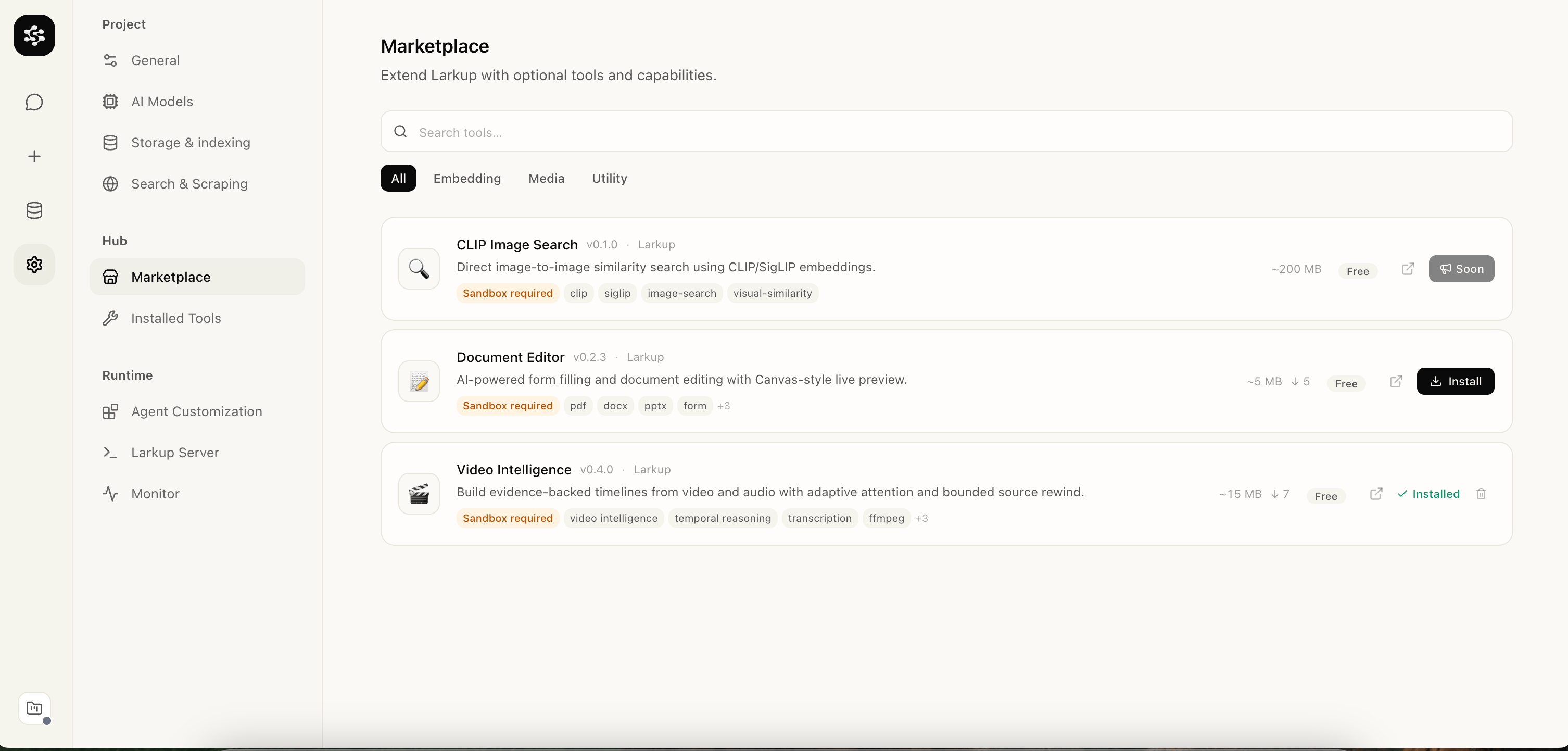
Open Settings → Marketplace and install Video Intelligence (New). The tool is isolated, so uninstalling it removes its client and runtime integration without changing your existing data.
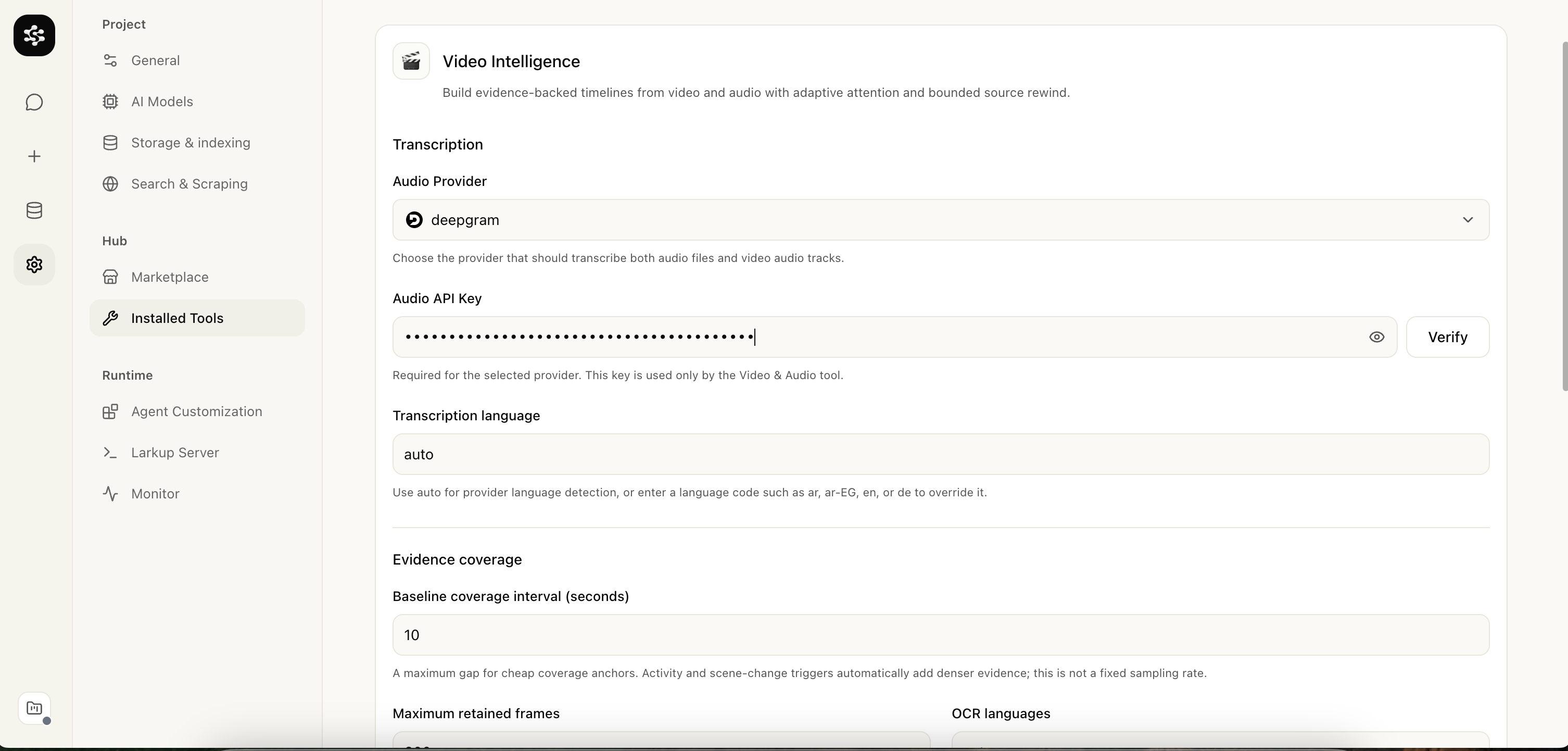
Open Settings → Installed Tools → Video Intelligence. Larkup creates a private device connection automatically on first use; you do not enter or see an access key. The cloud GPU endpoint is managed by Larkup and is not shown or configured in the browser.You can also select the audio provider for a video’s speech track. Larkup Cloud is the default managed multilingual pipeline. If you select OpenAI, Groq, Deepgram, or ElevenLabs, use the provider icon and Verify button to confirm your own key before indexing.With an external provider selected, Larkup sends the source directly to that provider for transcription; its key is never forwarded to the video GPU worker. The cloud worker continues OCR and visual analysis.
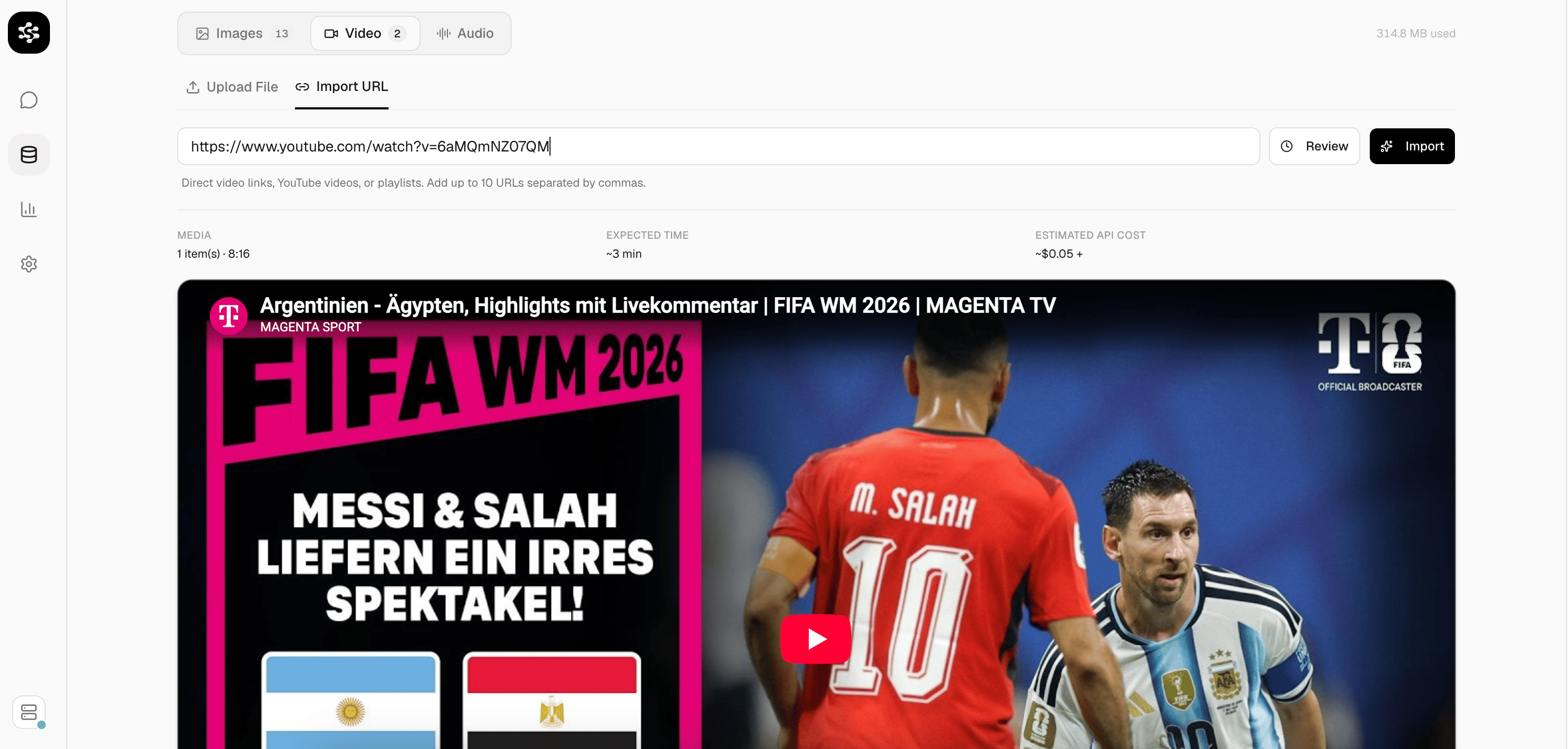
Open Data → Media and choose a file. Before upload, Guide video indexing lets you optionally describe the goal, known people/teams/objects, and questions you expect to ask.Enable Analyze every frame only when a rare detail may appear for a single frame and you are authorized to process the complete footage. It provides the highest coverage but is much slower and may require a cloud entitlement.
Importing a YouTube video from the Media tab
Larkup Cloud transcribes speech, reads visible text, detects objects, assigns anonymous tracks, and builds timestamped evidence in the background. It also writes a source-language chronological notebook that connects names from speech with supported visual layout and later events. Every transcript segment, OCR reading, and detection remains searchable with its source timestamp rather than relying only on a broad summary. The progress display reports confirmed work continuously, including measured download bytes, speed, and ETA when available.
Balanced is the default. Use Deep for slides, code, scoreboards, or dense visual changes; use Fast
when a quick overview matters more than visual detail.
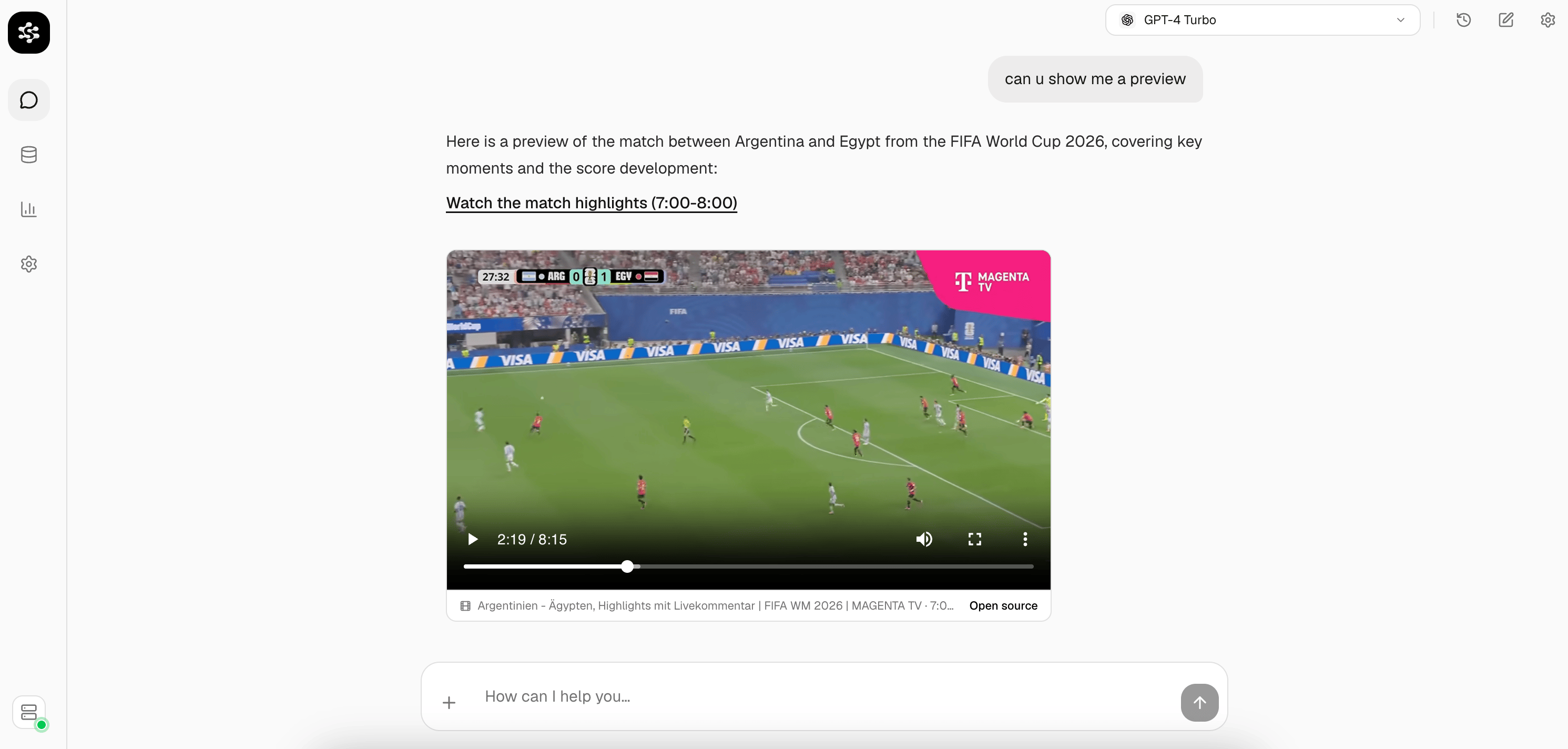
Open Chat and ask about the video: who said something, what happened at a certain point, or what the outcome was.
Chat answer with an embedded video player and timestamp citation
Try asking, “What was the final score and when did it change?” or “Explain the code shown while the instructor discussed authentication.” Answers use the timestamped transcript/OCR/object evidence first. If the chat model adds general knowledge that was not shown in the source, it must identify that part as an inference.Chat answers directly when multiple compatible indexed observations establish a result as a chronological trail. For an exact result, count, identity, or other weakly supported answer, it narrows the question to the best candidate moments and performs a bounded follow-up inspection before it gives up. This keeps ordinary indexed answers fast while still checking claims the index cannot safely settle.
The Media panel warns you when 80% of the monthly video-minute allowance has been used. Select Request more usage to send your contact details and current allowance summary to the Larkup team. This is a temporary request flow until self-service billing is available.
Your original Data-library asset remains the canonical local copy. To run GPU OCR and video analysis, Larkup sends a temporary KMS-encrypted processing copy to the managed worker; it is deleted when the job completes, fails, or is cancelled. After Larkup receives the timestamped evidence locally, it acknowledges and removes the temporary cloud result too. One-day lifecycle rules remove abandoned temporary objects as a safety bound. Cloud usage is metered by source minutes and concurrency per API key.
{"docsConfig":{"theme":"mint","$schema":"https://mintlify.com/docs.json","name":"Larkup","colors":{"primary":"#000000","light":"#000000","dark":"#222222"},"logo":{"light":"https://mintcdn.com/larkup/J0lnyYIE7T-PEajl/documentation/logo/logo-light2.png?fit=max\u0026auto=format\u0026n=J0lnyYIE7T-PEajl\u0026q=85\u0026s=a8d0f36de4d9d0698e8a6ee73e6bf1aa","dark":"https://mintcdn.com/larkup/J0lnyYIE7T-PEajl/documentation/logo/logo-dark2.png?fit=max\u0026auto=format\u0026n=J0lnyYIE7T-PEajl\u0026q=85\u0026s=fa0405df7faa06592472499c015d828c"},"favicon":"https://mintcdn.com/larkup/J0lnyYIE7T-PEajl/documentation/images/favicon.ico?fit=max\u0026auto=format\u0026n=J0lnyYIE7T-PEajl\u0026q=85\u0026s=feef65be53c3a3fe73a8289e38d3fd83","background":{"color":{"light":"#F9FAFB","dark":"#0F1117"}},"navbar":{"links":[{"href":"mailto:abdelrahmanaboneda@gmail.com","label":"Support"}],"primary":{"type":"button","label":"GitHub","href":"https://github.com/Larkup-AI/larkup"}},"footer":{"socials":{"github":"https://github.com/Larkup-AI/larkup"}},"contextual":{"options":["copy"],"display":"header"},"styling":{"latex":false},"navigation":{"pages":[]}},"deployment":{"deploymentMetadataValue":{"subdomain":"larkup","hasAudioNarration":false,"actualSubdomain":"larkup","customDomains":["larkup.de"],"gitSource":{"type":"github","owner":"larkup-ai","repo":"larkup","deployBranch":"main","contentDirectory":"docs","isPrivate":false,"mountPath":"","label":""},"chroma":{"collectionId":"41ed47f6-9e92-488c-bf50-0a09ec845389","liveDeploymentHistoryId":"6ad54ec7cfe0d5be20f803dd","schemaVersion":"v3","latestBuiltDeploymentHistoryId":"6ad54ec7cfe0d5be20f803dd"},"entitlements":{},"buildId":"6ad54ec7cfe0d5be20f803dd","clientVersion":"0.0.3971","searchFilterCounts":[{"language":"default","tag":"Documentation","count":13},{"language":"default","tag":"API Reference","count":11},{"language":"default","tag":"Use Cases","count":6},{"language":"default","tag":"Documents","count":5},{"language":"default","tag":"Getting Started","count":5},{"language":"default","tag":"Marketplace","count":5},{"language":"default","tag":"SDK","count":5},{"language":"default","tag":"Developer Guide","count":4},{"language":"default","tag":"Querying","count":2},{"language":"default","tag":"Overview","count":2}]},"assistantConfig":{"enableAskAiButton":false,"enableStarterQuestions":false,"enableContextualStarterQuestions":false,"enableAskAiSearchBar":true},"basePath":"/documentation","hasChatPermissions":false,"hasWebMcpPermissions":false,"toggles":[],"isAtlas":false,"googleFontsInlined":false},"customCss":[{"filePath":"documentation/style.css","content":""}],"page":{"pagePath":"documentation/guide/video-chat","slug":"/documentation/guide/video-chat","pageMetadata":{"title":"Chat with Video","description":"Ask questions about a video and get answers with a timestamp.","href":"/documentation/guide/video-chat"},"description":{"compiledSource":"\"use strict\";\nconst {jsx: _jsx} = arguments[0];\nconst {useMDXComponents: _provideComponents} = arguments[0];\nfunction _createMdxContent(props) {\n const _components = {\n p: \"p\",\n ..._provideComponents(),\n ...props.components\n };\n return _jsx(_components.p, {\n children: \"Ask questions about a video and get answers with a timestamp.\"\n });\n}\nfunction MDXContent(props = {}) {\n const {wrapper: MDXLayout} = {\n ..._provideComponents(),\n ...props.components\n };\n return MDXLayout ? _jsx(MDXLayout, {\n ...props,\n children: _jsx(_createMdxContent, {\n ...props\n })\n }) : _createMdxContent(props);\n}\nreturn {\n default: MDXContent\n};\n","frontmatter":{},"scope":{}},"pageType":"default","mdx":{"mdxSource":{"compiledSource":"\"use strict\";const{Fragment:_Fragment,jsx:_jsx,jsxs:_jsxs}=arguments[0];const{useMDXComponents:_provideComponents}=arguments[0];function _createMdxContent(props){const _components={p:`p`,strong:`strong`,..._provideComponents(),...props.components},{Frame,Heading,OptimizedImage,Tip}=_components;if(!Frame)_missingMdxReference(`Frame`,true);if(!Heading)_missingMdxReference(`Heading`,true);if(!OptimizedImage)_missingMdxReference(`OptimizedImage`,true);if(!Tip)_missingMdxReference(`Tip`,true);return _jsxs(_Fragment,{children:[_jsx(_components.p,{children:`Import a video and ask about it in Chat. Larkup finds the moment, plays it back, and cites the timestamp.`}),`\n`,_jsx(Heading,{level:`2`,id:`install-the-tool`,children:`Install the tool`}),`\n`,_jsxs(_components.p,{children:[`Open `,_jsx(_components.strong,{children:`Settings → Marketplace`}),` and install `,_jsx(_components.strong,{children:`Video Intelligence (New)`}),`. The tool is isolated, so uninstalling it removes its client and runtime integration without changing your existing data.`]}),`\n`,_jsx(Frame,{caption:`Marketplace with Video Intelligence available`,children:_jsx(OptimizedImage,{src:`https://mintcdn.com/larkup/13l_fOT1PJRw-f4o/documentation/images/tools/marketplace-view.png?fit=max\u0026auto=format\u0026n=13l_fOT1PJRw-f4o\u0026q=85\u0026s=75e4cde6eb8560d0a6313641c7c3d9e2`,alt:`Marketplace showing Video Intelligence tool`,\"data-og-width\":`3012`,width:`3012`,\"data-og-height\":`1442`,height:`1442`,\"data-path\":`documentation/images/tools/marketplace-view.png`,\"data-optimize\":`true`,\"data-opv\":`3`,srcset:`https://mintcdn.com/larkup/13l_fOT1PJRw-f4o/documentation/images/tools/marketplace-view.png?w=280\u0026fit=max\u0026auto=format\u0026n=13l_fOT1PJRw-f4o\u0026q=85\u0026s=68c3dc74153387248de990430c846029 280w, https://mintcdn.com/larkup/13l_fOT1PJRw-f4o/documentation/images/tools/marketplace-view.png?w=560\u0026fit=max\u0026auto=format\u0026n=13l_fOT1PJRw-f4o\u0026q=85\u0026s=facfaa07ba9e552a01b169cdc2eecefc 560w, https://mintcdn.com/larkup/13l_fOT1PJRw-f4o/documentation/images/tools/marketplace-view.png?w=840\u0026fit=max\u0026auto=format\u0026n=13l_fOT1PJRw-f4o\u0026q=85\u0026s=320c327cb0efcccfd3795fdf76ecc20a 840w, https://mintcdn.com/larkup/13l_fOT1PJRw-f4o/documentation/images/tools/marketplace-view.png?w=1100\u0026fit=max\u0026auto=format\u0026n=13l_fOT1PJRw-f4o\u0026q=85\u0026s=514a9fa3679cf0645cca32ec4a4f1bad 1100w, https://mintcdn.com/larkup/13l_fOT1PJRw-f4o/documentation/images/tools/marketplace-view.png?w=1650\u0026fit=max\u0026auto=format\u0026n=13l_fOT1PJRw-f4o\u0026q=85\u0026s=2db1eb934e7223a84af3634b8ecb1926 1650w, https://mintcdn.com/larkup/13l_fOT1PJRw-f4o/documentation/images/tools/marketplace-view.png?w=2500\u0026fit=max\u0026auto=format\u0026n=13l_fOT1PJRw-f4o\u0026q=85\u0026s=7707b117b009c8507f5fcf4f4adb797f 2500w`})}),`\n`,_jsx(Heading,{level:`2`,id:`connect-larkup-cloud`,children:`Connect Larkup Cloud`}),`\n`,_jsxs(_components.p,{children:[`Open `,_jsx(_components.strong,{children:`Settings → Installed Tools → Video Intelligence`}),`. Larkup creates a private device connection automatically on first use; you do not enter or see an access key. The cloud GPU endpoint is managed by Larkup and is not shown or configured in the browser.`]}),`\n`,_jsxs(_components.p,{children:[`You can also select the audio provider for a video’s speech track. `,_jsx(_components.strong,{children:`Larkup Cloud`}),` is the default managed multilingual pipeline. If you select OpenAI, Groq, Deepgram, or ElevenLabs, use the provider icon and `,_jsx(_components.strong,{children:`Verify`}),` button to confirm your own key before indexing.`]}),`\n`,_jsx(_components.p,{children:`With an external provider selected, Larkup sends the source directly to that provider for transcription; its key is never forwarded to the video GPU worker. The cloud worker continues OCR and visual analysis.`}),`\n`,_jsx(Frame,{caption:`Video Intelligence runtime settings`,children:_jsx(OptimizedImage,{src:`https://mintcdn.com/larkup/13l_fOT1PJRw-f4o/documentation/images/tools/set-audio-video.png?fit=max\u0026auto=format\u0026n=13l_fOT1PJRw-f4o\u0026q=85\u0026s=aec0962cedb756c6d5956a6b51175aef`,alt:`Video Intelligence audio provider and language settings`,\"data-og-width\":`3012`,width:`3012`,\"data-og-height\":`1442`,height:`1442`,\"data-path\":`documentation/images/tools/set-audio-video.png`,\"data-optimize\":`true`,\"data-opv\":`3`,srcset:`https://mintcdn.com/larkup/13l_fOT1PJRw-f4o/documentation/images/tools/set-audio-video.png?w=280\u0026fit=max\u0026auto=format\u0026n=13l_fOT1PJRw-f4o\u0026q=85\u0026s=781ae4525a164f303404b31f06b7c1b5 280w, https://mintcdn.com/larkup/13l_fOT1PJRw-f4o/documentation/images/tools/set-audio-video.png?w=560\u0026fit=max\u0026auto=format\u0026n=13l_fOT1PJRw-f4o\u0026q=85\u0026s=00b541a3f845b2ae667e53d153e0b89e 560w, https://mintcdn.com/larkup/13l_fOT1PJRw-f4o/documentation/images/tools/set-audio-video.png?w=840\u0026fit=max\u0026auto=format\u0026n=13l_fOT1PJRw-f4o\u0026q=85\u0026s=df10c584d93fc4931f78607d96050052 840w, https://mintcdn.com/larkup/13l_fOT1PJRw-f4o/documentation/images/tools/set-audio-video.png?w=1100\u0026fit=max\u0026auto=format\u0026n=13l_fOT1PJRw-f4o\u0026q=85\u0026s=7ca2a6d33ef4f013c99bf10d780a5f22 1100w, https://mintcdn.com/larkup/13l_fOT1PJRw-f4o/documentation/images/tools/set-audio-video.png?w=1650\u0026fit=max\u0026auto=format\u0026n=13l_fOT1PJRw-f4o\u0026q=85\u0026s=e53191ce63864dcfcf27070ef5cefa1f 1650w, https://mintcdn.com/larkup/13l_fOT1PJRw-f4o/documentation/images/tools/set-audio-video.png?w=2500\u0026fit=max\u0026auto=format\u0026n=13l_fOT1PJRw-f4o\u0026q=85\u0026s=94c482b4155e2e4cec7072f4b72b83e2 2500w`})}),`\n`,_jsx(Heading,{level:`2`,id:`import-a-video`,children:`Import a video`}),`\n`,_jsxs(_components.p,{children:[`Open `,_jsx(_components.strong,{children:`Data → Media`}),` and choose a file. Before upload, `,_jsx(_components.strong,{children:`Guide video indexing`}),` lets you optionally describe the goal, known people/teams/objects, and questions you expect to ask.`]}),`\n`,_jsxs(_components.p,{children:[`Enable `,_jsx(_components.strong,{children:`Analyze every frame`}),` only when a rare detail may appear for a single frame and you are authorized to process the complete footage. It provides the highest coverage but is much slower and may require a cloud entitlement.`]}),`\n`,_jsx(Frame,{caption:`Importing a YouTube video from the Media tab`,children:_jsx(OptimizedImage,{src:`https://mintcdn.com/larkup/13l_fOT1PJRw-f4o/documentation/images/add/upload-video-data-page.png?fit=max\u0026auto=format\u0026n=13l_fOT1PJRw-f4o\u0026q=85\u0026s=3111ea76189c695938d8c962fd021fb8`,alt:`Media tab with YouTube URL import`,\"data-og-width\":`2982`,width:`2982`,\"data-og-height\":`1424`,height:`1424`,\"data-path\":`documentation/images/add/upload-video-data-page.png`,\"data-optimize\":`true`,\"data-opv\":`3`,srcset:`https://mintcdn.com/larkup/13l_fOT1PJRw-f4o/documentation/images/add/upload-video-data-page.png?w=280\u0026fit=max\u0026auto=format\u0026n=13l_fOT1PJRw-f4o\u0026q=85\u0026s=b5d8312d6359bca6b1d358be191b74d3 280w, https://mintcdn.com/larkup/13l_fOT1PJRw-f4o/documentation/images/add/upload-video-data-page.png?w=560\u0026fit=max\u0026auto=format\u0026n=13l_fOT1PJRw-f4o\u0026q=85\u0026s=eff942621568b09192536617736874be 560w, https://mintcdn.com/larkup/13l_fOT1PJRw-f4o/documentation/images/add/upload-video-data-page.png?w=840\u0026fit=max\u0026auto=format\u0026n=13l_fOT1PJRw-f4o\u0026q=85\u0026s=41ea85d83c2da9c4cf4267dc1f3fcf57 840w, https://mintcdn.com/larkup/13l_fOT1PJRw-f4o/documentation/images/add/upload-video-data-page.png?w=1100\u0026fit=max\u0026auto=format\u0026n=13l_fOT1PJRw-f4o\u0026q=85\u0026s=9b07b38cb47e79aa8426dd5ae2ab00f3 1100w, https://mintcdn.com/larkup/13l_fOT1PJRw-f4o/documentation/images/add/upload-video-data-page.png?w=1650\u0026fit=max\u0026auto=format\u0026n=13l_fOT1PJRw-f4o\u0026q=85\u0026s=7b305418fb6e433b27b53fd369d3b59f 1650w, https://mintcdn.com/larkup/13l_fOT1PJRw-f4o/documentation/images/add/upload-video-data-page.png?w=2500\u0026fit=max\u0026auto=format\u0026n=13l_fOT1PJRw-f4o\u0026q=85\u0026s=4b02e058f5a08efec5aa4ef001662e98 2500w`})}),`\n`,_jsx(_components.p,{children:`Larkup Cloud transcribes speech, reads visible text, detects objects, assigns anonymous tracks, and builds timestamped evidence in the background. It also writes a source-language chronological notebook that connects names from speech with supported visual layout and later events. Every transcript segment, OCR reading, and detection remains searchable with its source timestamp rather than relying only on a broad summary. The progress display reports confirmed work continuously, including measured download bytes, speed, and ETA when available.`}),`\n`,_jsx(Tip,{children:_jsx(_components.p,{children:`Balanced is the default. Use Deep for slides, code, scoreboards, or dense visual changes; use Fast\nwhen a quick overview matters more than visual detail.`})}),`\n`,_jsx(Heading,{level:`2`,id:`ask-in-chat`,children:`Ask in Chat`}),`\n`,_jsxs(_components.p,{children:[`Open `,_jsx(_components.strong,{children:`Chat`}),` and ask about the video: who said something, what happened at a certain point, or what the outcome was.`]}),`\n`,_jsx(Frame,{caption:`Chat answer with an embedded video player and timestamp citation`,children:_jsx(OptimizedImage,{src:`https://mintcdn.com/larkup/13l_fOT1PJRw-f4o/documentation/images/add/video-preview-chat-reply.png?fit=max\u0026auto=format\u0026n=13l_fOT1PJRw-f4o\u0026q=85\u0026s=fdd78c36bfb1abe8f64fb4abb8c35daa`,alt:`Chat reply with embedded video at cited timestamp`,\"data-og-width\":`2982`,width:`2982`,\"data-og-height\":`1424`,height:`1424`,\"data-path\":`documentation/images/add/video-preview-chat-reply.png`,\"data-optimize\":`true`,\"data-opv\":`3`,srcset:`https://mintcdn.com/larkup/13l_fOT1PJRw-f4o/documentation/images/add/video-preview-chat-reply.png?w=280\u0026fit=max\u0026auto=format\u0026n=13l_fOT1PJRw-f4o\u0026q=85\u0026s=f469ae4a9c96d8c092bc37e8cbc77b42 280w, https://mintcdn.com/larkup/13l_fOT1PJRw-f4o/documentation/images/add/video-preview-chat-reply.png?w=560\u0026fit=max\u0026auto=format\u0026n=13l_fOT1PJRw-f4o\u0026q=85\u0026s=bc075ff96d5ddc53fb287c98364ba5f5 560w, https://mintcdn.com/larkup/13l_fOT1PJRw-f4o/documentation/images/add/video-preview-chat-reply.png?w=840\u0026fit=max\u0026auto=format\u0026n=13l_fOT1PJRw-f4o\u0026q=85\u0026s=00bedc414cede4ae50ae560e0a9be490 840w, https://mintcdn.com/larkup/13l_fOT1PJRw-f4o/documentation/images/add/video-preview-chat-reply.png?w=1100\u0026fit=max\u0026auto=format\u0026n=13l_fOT1PJRw-f4o\u0026q=85\u0026s=1c71e5de44091f29c1e8335747c95348 1100w, https://mintcdn.com/larkup/13l_fOT1PJRw-f4o/documentation/images/add/video-preview-chat-reply.png?w=1650\u0026fit=max\u0026auto=format\u0026n=13l_fOT1PJRw-f4o\u0026q=85\u0026s=81ef43d370389ed20135f99f9011563d 1650w, https://mintcdn.com/larkup/13l_fOT1PJRw-f4o/documentation/images/add/video-preview-chat-reply.png?w=2500\u0026fit=max\u0026auto=format\u0026n=13l_fOT1PJRw-f4o\u0026q=85\u0026s=9ce204dbd545a1d08b417c6a5b33bd3a 2500w`})}),`\n`,_jsx(_components.p,{children:`Try asking, “What was the final score and when did it change?” or “Explain the code shown while the instructor discussed authentication.” Answers use the timestamped transcript/OCR/object evidence first. If the chat model adds general knowledge that was not shown in the source, it must identify that part as an inference.`}),`\n`,_jsx(_components.p,{children:`Chat answers directly when multiple compatible indexed observations establish a result as a chronological trail. For an exact result, count, identity, or other weakly supported answer, it narrows the question to the best candidate moments and performs a bounded follow-up inspection before it gives up. This keeps ordinary indexed answers fast while still checking claims the index cannot safely settle.`}),`\n`,_jsx(Heading,{level:`2`,id:`cloud-allowance`,children:`Cloud allowance`}),`\n`,_jsxs(_components.p,{children:[`The Media panel warns you when 80% of the monthly video-minute allowance has been used. Select `,_jsx(_components.strong,{children:`Request more usage`}),` to send your contact details and current allowance summary to the Larkup team. This is a temporary request flow until self-service billing is available.`]}),`\n`,_jsx(Heading,{level:`2`,id:`privacy-and-retention`,children:`Privacy and retention`}),`\n`,_jsx(_components.p,{children:`Your original Data-library asset remains the canonical local copy. To run GPU OCR and video analysis, Larkup sends a temporary KMS-encrypted processing copy to the managed worker; it is deleted when the job completes, fails, or is cancelled. After Larkup receives the timestamped evidence locally, it acknowledges and removes the temporary cloud result too. One-day lifecycle rules remove abandoned temporary objects as a safety bound. Cloud usage is metered by source minutes and concurrency per API key.`})]})}function MDXContent(props={}){const{wrapper:MDXLayout}={..._provideComponents(),...props.components};return MDXLayout?_jsx(MDXLayout,{...props,children:_jsx(_createMdxContent,{...props})}):_createMdxContent(props)}return{default:MDXContent};function _missingMdxReference(id,component){throw new Error(`Expected `+(component?`component`:`object`)+\" `\"+id+\"` to be defined: you likely forgot to import, pass, or provide it.\")}","frontmatter":{},"scope":{"config":{},"pageMetadata":{"title":"Chat with Video","description":"Ask questions about a video and get answers with a timestamp.","href":"/documentation/guide/video-chat"}}},"mdxSourceWithNoJs":null},"mdxExtracts":{"tableOfContents":[{"title":"Install the tool","slug":"install-the-tool","depth":2,"children":[]},{"title":"Connect Larkup Cloud","slug":"connect-larkup-cloud","depth":2,"children":[]},{"title":"Import a video","slug":"import-a-video","depth":2,"children":[]},{"title":"Ask in Chat","slug":"ask-in-chat","depth":2,"children":[]},{"title":"Cloud allowance","slug":"cloud-allowance","depth":2,"children":[]},{"title":"Privacy and retention","slug":"privacy-and-retention","depth":2,"children":[]}],"codeExamples":{}},"jsLinks":[],"subdomain":"larkup","siteName":"Larkup","title":"Chat with Video - Larkup","navMaps":{"firstHrefInVersion":{},"firstHrefInLanguage":{}},"lastModified":"2026-09-03T12:34:35.080Z","originalFileLocation":"documentation/guide/video-chat.mdx"},"headHtml":"\u003cscript data-mint-head>(function(){var d=document.documentElement,p=null;if(!p){try{p=localStorage.getItem(\"isDarkMode\")}catch(e){}if(p==='true')p='dark';else if(p==='false')p='light';if(p!=='light'\u0026\u0026p!=='dark'\u0026\u0026p!=='system')p=\"system\"}var r=p==='system'?(matchMedia(\"(prefers-color-scheme: dark)\").matches?'dark':'light'):p;d.classList.remove(r==='dark'?'light':'dark');d.classList.add(r);d.setAttribute(\"data-theme-preference\",p)})();\u003c/script>\u003cmeta data-mint-head name=\"description\" content=\"Ask questions about a video and get answers with a timestamp.\">\u003cmeta data-mint-head name=\"application-name\" content=\"Larkup\">\u003cmeta data-mint-head name=\"generator\" content=\"Mintlify\">\u003clink data-mint-head rel=\"icon\" type=\"image/png\" sizes=\"192x192\" href=\"/mintlify-assets/_mintlify/favicons/larkup/O-SbaNQDkZFAZqod/_generated/favicon/android-chrome-192x192.png\" media=\"(prefers-color-scheme: light)\">\u003clink data-mint-head rel=\"apple-touch-icon\" type=\"image/png\" sizes=\"180x180\" href=\"/mintlify-assets/_mintlify/favicons/larkup/O-SbaNQDkZFAZqod/_generated/favicon/apple-touch-icon.png\">\u003clink data-mint-head rel=\"icon\" type=\"image/png\" sizes=\"16x16\" href=\"/mintlify-assets/_mintlify/favicons/larkup/O-SbaNQDkZFAZqod/_generated/favicon/favicon-16x16.png\" media=\"(prefers-color-scheme: light)\">\u003clink data-mint-head rel=\"icon\" type=\"image/png\" sizes=\"32x32\" href=\"/mintlify-assets/_mintlify/favicons/larkup/O-SbaNQDkZFAZqod/_generated/favicon/favicon-32x32.png\" media=\"(prefers-color-scheme: light)\">\u003clink data-mint-head rel=\"shortcut icon\" type=\"image/x-icon\" href=\"/mintlify-assets/_mintlify/favicons/larkup/O-SbaNQDkZFAZqod/_generated/favicon/favicon.ico\" media=\"(prefers-color-scheme: light)\">\u003clink data-mint-head rel=\"icon\" type=\"image/png\" sizes=\"192x192\" href=\"/mintlify-assets/_mintlify/favicons/larkup/O-SbaNQDkZFAZqod/_generated/favicon-dark/android-chrome-192x192.png\" media=\"(prefers-color-scheme: dark)\">\u003clink data-mint-head rel=\"icon\" type=\"image/png\" sizes=\"16x16\" href=\"/mintlify-assets/_mintlify/favicons/larkup/O-SbaNQDkZFAZqod/_generated/favicon-dark/favicon-16x16.png\" media=\"(prefers-color-scheme: dark)\">\u003clink data-mint-head rel=\"icon\" type=\"image/png\" sizes=\"32x32\" href=\"/mintlify-assets/_mintlify/favicons/larkup/O-SbaNQDkZFAZqod/_generated/favicon-dark/favicon-32x32.png\" media=\"(prefers-color-scheme: dark)\">\u003clink data-mint-head rel=\"shortcut icon\" type=\"image/x-icon\" href=\"/mintlify-assets/_mintlify/favicons/larkup/O-SbaNQDkZFAZqod/_generated/favicon-dark/favicon.ico\" media=\"(prefers-color-scheme: dark)\">\u003cmeta data-mint-head property=\"og:title\" content=\"Chat with Video - Larkup\">\u003cmeta data-mint-head property=\"og:description\" content=\"Ask questions about a video and get answers with a timestamp.\">\u003cmeta data-mint-head property=\"og:site_name\" content=\"Larkup\">\u003cmeta data-mint-head property=\"og:url\" content=\"https://larkup.de/documentation/guide/video-chat\">\u003cmeta data-mint-head property=\"og:type\" content=\"website\">\u003cmeta data-mint-head property=\"og:image\" content=\"https://larkup.mintlify.app/_mintlify/api/og/v2?division=Use+Cases\u0026amp;title=Chat+with+Video\u0026amp;description=Ask+questions+about+a+video+and+get+answers+with+a+timestamp.\u0026amp;theme=bde185ca85eb94a198a8ed1e\u0026amp;signature=7e5df5a3991647cc80498c3a22bc33e7fd86367ce36ecd31d7add6457b564720\">\u003cmeta data-mint-head property=\"og:image:width\" content=\"1200\">\u003cmeta data-mint-head property=\"og:image:height\" content=\"630\">\u003cmeta data-mint-head name=\"twitter:card\" content=\"summary_large_image\">\u003cmeta data-mint-head name=\"twitter:title\" content=\"Chat with Video - Larkup\">\u003cmeta data-mint-head name=\"twitter:description\" content=\"Ask questions about a video and get answers with a timestamp.\">\u003cmeta data-mint-head name=\"twitter:image\" content=\"https://larkup.mintlify.app/_mintlify/api/og/v2?division=Use+Cases\u0026amp;title=Chat+with+Video\u0026amp;description=Ask+questions+about+a+video+and+get+answers+with+a+timestamp.\u0026amp;theme=bde185ca85eb94a198a8ed1e\u0026amp;signature=7e5df5a3991647cc80498c3a22bc33e7fd86367ce36ecd31d7add6457b564720\">\u003cmeta data-mint-head name=\"twitter:image:width\" content=\"1200\">\u003cmeta data-mint-head name=\"twitter:image:height\" content=\"630\">\u003cmeta data-mint-head name=\"msapplication-config\" content=\"/mintlify-assets/_mintlify/favicons/larkup/O-SbaNQDkZFAZqod/_generated/favicon/browserconfig.xml\">\u003cmeta data-mint-head name=\"apple-mobile-web-app-title\" content=\"Larkup\">\u003cmeta data-mint-head name=\"msapplication-TileColor\" content=\"#000000\">\u003clink data-mint-head rel=\"canonical\" href=\"https://larkup.de/documentation/guide/video-chat\">\u003clink data-mint-head rel=\"alternate\" type=\"application/xml\" href=\"/sitemap.xml\">\u003clink data-mint-head rel=\"alternate\" type=\"text/markdown\" href=\"/documentation/guide/video-chat.md\">\u003cscript data-mint-head type=\"application/ld+json\">{\"@context\":\"https://schema.org\",\"@graph\":[{\"@type\":\"Organization\",\"@id\":\"https://larkup.de/#organization\",\"name\":\"Larkup\",\"url\":\"https://larkup.de\",\"logo\":{\"@type\":\"ImageObject\",\"url\":\"https://mintcdn.com/larkup/J0lnyYIE7T-PEajl/documentation/logo/logo-light2.png?fit=max\u0026auto=format\u0026n=J0lnyYIE7T-PEajl\u0026q=85\u0026s=a8d0f36de4d9d0698e8a6ee73e6bf1aa\"}},{\"@type\":\"WebSite\",\"@id\":\"https://larkup.de#website\",\"name\":\"Larkup\",\"url\":\"https://larkup.de\",\"publisher\":{\"@id\":\"https://larkup.de/#organization\"}},{\"@type\":\"WebPage\",\"@id\":\"https://larkup.de/documentation/guide/video-chat#webpage\",\"url\":\"https://larkup.de/documentation/guide/video-chat\",\"name\":\"Chat with Video\",\"description\":\"Ask questions about a video and get answers with a timestamp.\",\"dateModified\":\"2026-09-03T12:34:35.080Z\",\"isPartOf\":{\"@id\":\"https://larkup.de#website\"},\"breadcrumb\":{\"@id\":\"https://larkup.de/documentation/guide/video-chat#breadcrumb\"}},{\"@type\":\"BreadcrumbList\",\"@id\":\"https://larkup.de/documentation/guide/video-chat#breadcrumb\",\"itemListElement\":[{\"@type\":\"ListItem\",\"position\":1,\"name\":\"Use Cases\",\"item\":\"https://larkup.de/documentation/guide/build-rag-server\"},{\"@type\":\"ListItem\",\"position\":2,\"name\":\"Chat with Video\",\"item\":\"https://larkup.de/documentation/guide/video-chat\"}]},{\"@type\":[\"Article\",\"TechArticle\"],\"@id\":\"https://larkup.de/documentation/guide/video-chat#article\",\"headline\":\"Chat with Video\",\"name\":\"Chat with Video\",\"description\":\"Ask questions about a video and get answers with a timestamp.\",\"url\":\"https://larkup.de/documentation/guide/video-chat\",\"mainEntityOfPage\":{\"@id\":\"https://larkup.de/documentation/guide/video-chat#webpage\"},\"dateModified\":\"2026-09-03T12:34:35.080Z\",\"publisher\":{\"@id\":\"https://larkup.de/#organization\"},\"isPartOf\":{\"@id\":\"https://larkup.de#website\"}}]}\u003c/script>\u003cscript data-mint-head type=\"application/ld+json\">{\"@context\":\"https://schema.org\",\"@type\":\"WebSite\",\"name\":\"Larkup\",\"creator\":{\"@type\":\"Organization\",\"name\":\"Mintlify\",\"url\":\"https://mintlify.com\"}}\u003c/script>","siteName":"Larkup","nav":{"global":null,"tabs":[{"tab":"Documentation","groups":[{"group":"Getting Started","pages":[{"title":"Introduction","href":"/documentation"},{"title":"Installation","href":"/documentation/guide/installation"},{"title":"Quickstart","href":"/documentation/guide/quickstart"}]},{"group":"Use Cases","pages":[{"title":"Build Your RAG Server","href":"/documentation/guide/build-rag-server"},{"title":"Web Crawl at Scale","description":"Crawl websites, upload files, pull integrations, and track every ingestion job.","href":"/documentation/guide/data-loading"},{"title":"Chat with Video","href":"/documentation/guide/video-chat"},{"title":"Talk to Your Custom AI from Social Media","sidebarTitle":"AI in Social Media","description":"Launch your Agent Server, then connect it to Telegram, Slack, or Discord.","href":"/documentation/guide/public-webhooks"},{"title":"Sign and Fill Documents","href":"/documentation/guide/document-editor"},{"title":"Analyze Tabular Data","href":"/documentation/guide/data-analysis"}]},{"group":"Developer Guide","pages":[{"title":"Agent Server API","href":"/documentation/developer/agent-runtime-api"},{"title":"Deploy Your Server","href":"/documentation/developer/deploy"},{"title":"CLI Reference","href":"/documentation/developer/cli"},{"title":"Configuration Reference","href":"/documentation/developer/configuration"}]}]},{"tab":"Marketplace","pages":[{"title":"Marketplace","href":"/documentation/marketplace/overview"}]},{"tab":"SDK","pages":[{"title":"SDK","href":"/documentation/sdk/overview"}]},{"tab":"API Reference","pages":[{"title":"API Reference","href":"/documentation/api-reference/overview"}]}]},"title":"Chat with Video - Larkup","buildId":"dpl_DFJrtvUi8HS5F9nkooKuDJsuD5BM","deploymentId":"dpl_DFJrtvUi8HS5F9nkooKuDJsuD5BM","dynamics":["07c022d89b","a74be98ba7"],"chunks":["Frame-COGkNuA6.js","DynamicMarkdown-85clUA0i.js","zoom-image-lightbox-BZxD9MAj.js","lightbox-handle-r17bVUz3.js"]}